 Otto
AI Email Compliance: What to Check Before You Connect
AI Email Compliance: What to Check Before You Connect

AI email compliance comes down to three questions: what the tool is allowed to read, what it is allowed to send, and whether you can show afterward what it did. For a founder, chief of staff or consultant, the safest setup is an assistant that drafts and never sends on its own. Otto works that way: nothing is sent or finalized without your explicit approval, so every outbound message has a human decision behind it.
This guide covers the practical side for small teams and independent professionals: permissions, data handling, prompt injection, approvals and the rules that most often come up in the US and abroad.
TL;DR
- Treat compliance as three controls: scoped mailbox access, human approval before anything goes out, and a record of what the AI did.
- Permissions are the real control. A prompt such as “only look in this folder” is a request, not a restriction.
- Ask every vendor in writing about model training, retention, subprocessors and data region.
- Rules differ by place: California has new automated-decision rules in force since 2026, and the EU AI Act became applicable on 2 August 2026.
- Otto drafts and you decide, which keeps a person accountable for every message that leaves your inbox.
Table of Contents
- What “AI email compliance” means in practice
- Which rules apply to you
- Check the mailbox permissions first
- Ask vendors these questions in writing
- Prompt injection: the risk that arrives in the inbox
- Human review is the control that auditors recognize
- What not to put into an AI email tool
- Why a shared-memory assistant fits a compliance mindset
- Promo
- Perspective
- FAQ
- Sources
What “AI email compliance” means in practice
When an AI tool reads, summarizes or drafts your email, it handles other people’s personal data and often your clients’ confidential material. Compliance is the discipline of controlling that. One vendor describes AI email governance as the policies, controls and oversight that decide what assistants may read, send and act on, and that record what they actually did. That definition is a good working one.
If you run a small company, you are the compliance function. There is no IT department to approve the connection. So the checks below are written for one person or a small team making the call.
Which rules apply to you
The US has no single federal AI-email law. Law firm Littler notes that the US relies on a patchwork of federal privacy and data-security laws, while most of its major trading partners have broad data-protection laws that cover AI processing of personal data.
Three things matter most for a US-based professional with international contacts:
- California. The state privacy agency adopted regulations on 24 July 2025, effective 1 January 2026, covering risk assessments, annual cybersecurity audits and consumer rights to access and opt out of automated decision-making technology.
- EU. The EU AI Act entered into force on 1 August 2024 and became applicable on 2 August 2026. Its transparency duties under Article 50 apply from the same date, including informing people when they interact directly with AI.
- GDPR. If your contacts or clients are in the EU, the vendor handling your inbox must offer sufficient guarantees under Article 28, and a data processing agreement (DPA) must specify the subject matter, duration, nature and purpose of processing, as this GDPR explainer summarizes. A DPA is simply the contract that fixes what the vendor may do with your data.
Regulators elsewhere say similar things. Switzerland’s cybersecurity office, working with the data-protection commissioner, warns that pasting a whole email into an AI prompt feeds personal data into the system, and that data which has left the company is hard to retrieve or delete.
If you handle health, legal or financial client data, ask your own lawyer which regime binds you. This article is a checklist, not legal advice.
Check the mailbox permissions first
Permissions are where most risk lives. Gmail and Microsoft 365 grant access in “scopes”, which are classes of operations rather than specific folders or tasks. In Microsoft 365, for example, Mail.ReadWrite lets an app create, read, update and delete mail but excludes sending, which needs the separate Mail.Send permission; Google restricts its compose and full-mailbox scopes and requires verification and a security assessment, as one security write-up notes.
A useful way to review a connection is to look at four layers: what the email provider authorizes, what the product actually exposes, the approval settings, and your own policy. One inbox-security guide points out that “look only in the supplier folder” does not create a narrow permission, and that a one-time approval should not quietly become approval for every later feature.
In practice:
- Read the permission screen line by line before you click allow.
- Match the scope to the job. If you only need summaries, read access is enough.
- Recheck the connection whenever the tool adds a capability.
- Keep work email in work accounts. Routing company mail through a personal account to get around a block is a policy bypass.
Our own guide to AI assistant security walks through what to review before you connect any assistant.
Ask vendors these questions in writing
Before you connect, get written answers on:
- Whether your inputs and outputs are used to train models, and how to opt out.
- Retention periods for inputs, outputs and logs.
- Where data is stored, and which regions are available.
- The published subprocessor list (the third parties that touch your data) and how changes are announced.
- A signed DPA, with standard contractual clauses for cross-border transfers.
- How fast the vendor notifies you of an incident. GDPR Article 33 sets 72 hours.
- What is deleted when you close the account.
This list follows a governance playbook, which also notes that consumer, enterprise and API plans usually carry different data terms. Check the terms of the plan you will actually be on, not the one on the marketing page.
For transfers of EU data to the US, the EU-US Data Privacy Framework adequacy decision of 10 July 2023 is the usual basis; the General Court upheld it on 3 September 2025, with an appeal pending.
Prompt injection: the risk that arrives in the inbox
An incoming email can contain instructions aimed at your AI, such as hidden text telling it to forward recent invoices. This is called prompt injection. OWASP’s “Excessive Agency” risk uses a mailbox-reading assistant as its example, and its mitigations include read-only access and a human who reviews and presses send on every AI-drafted email, per this summary.
Spain’s data-protection authority makes the same point about agentic AI: an agent on a user’s systems can start actions by itself, such as creating a reply or rewriting sensitive information into other places.
The controls that work sit outside the model:
- Separate approval for sending, sharing and deleting.
- Validation of content, recipient and operation before anything takes effect.
- Monitoring for quiet changes such as new OAuth grants, forwarding rules and delegates.
- A way to revoke access quickly. Note that a password reset does not invalidate delegated tokens, and revocation cannot recall a message already sent, according to IT-team guidance.
Sending is the strongest boundary because nothing can pull a message back from a recipient. The same inbox guide recommends showing the exact message, recipients and attachments for confirmation immediately before it goes out.
Human review is the control that auditors recognize
The Government of Canada’s AI security framework tells departments to treat AI outputs as recommendations, not verified facts or approved actions, validated by human review before they inform decisions or trigger actions. The UK regulator ICO likewise expects documented AI oversight: a named lead, signed-off risks, staff procedures and data protection impact assessments before processing begins.
For a small team, that translates into a short acceptable-use policy. One outline suggests six clauses: approved tools, prohibited data classes (card numbers, government IDs, health data, privileged material, customer data), mandatory human review before any external send, disclosure rules, incident reporting and consequences. One page is enough.
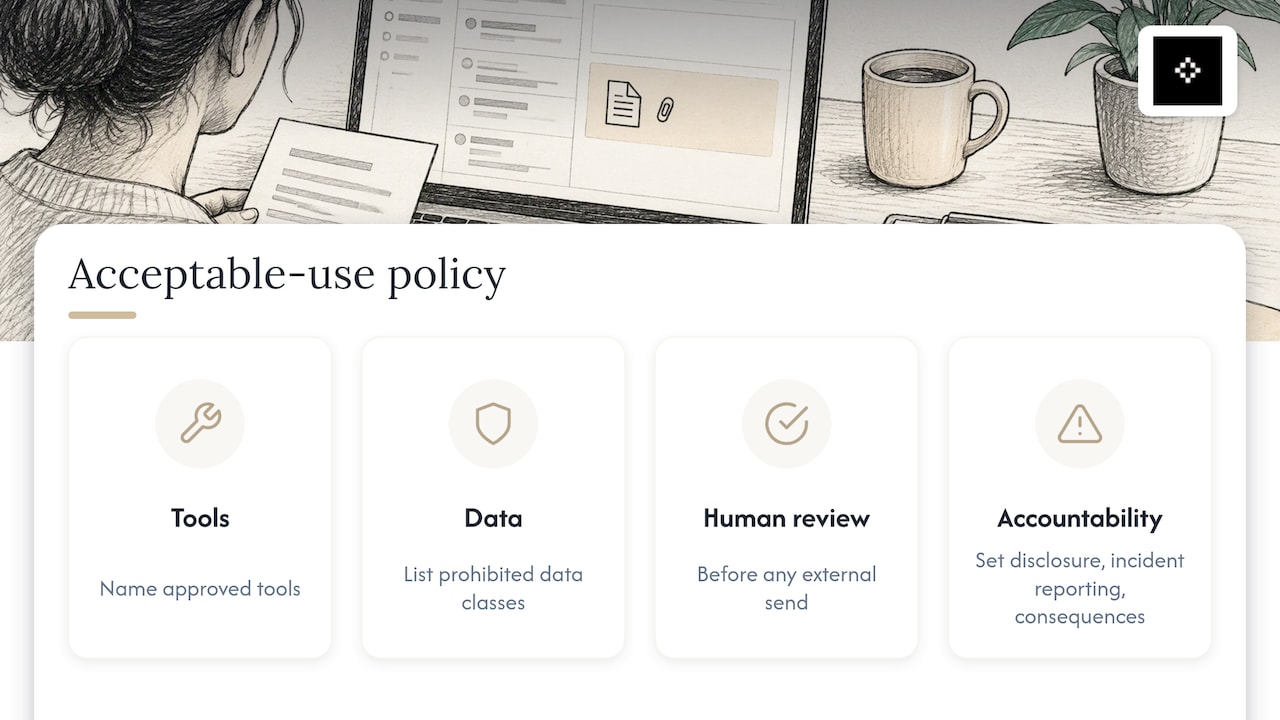
An approval step also needs rules about when it fires. Our guides on human-in-the-loop AI and email approval workflows cover how to set them, and five checks before you hit send covers the review itself.
Where agents read, draft or send email, this practical guide to email automation is also worth reading on the oversight consequential actions need.
What not to put into an AI email tool
Keep these out of prompts and out of any mailbox you connect without a clear reason: passwords and payment details, medical records, privileged legal strategy, HR matters, trade secrets and raw customer data. Swiss guidance names customer data, employee records, health data and credentials as sensitive categories that call for stricter controls. For client-heavy work, such as consulting and agencies, a separate low-sensitivity mailbox is one way to narrow what a tool can see.
Why a shared-memory assistant fits a compliance mindset
Most professionals now run several AI tools: a notetaker, an email helper, a contact manager. Each holds a slice of your data, each needs its own permissions, DPA and review. Every extra connection multiplies the questions above. You also become the person copying context between them, and that copying is where sensitive details leak.
Otto runs on one shared memory of your work. It listens in meetings, reads email and calendar, and captures every promise into a single ledger that it chases until closed. One tool to vet means one set of vendor answers, one permission review and one approval flow. Because Otto drafts and you decide, a person signs off on each outbound message.
Promo
Otto is an AI chief of staff for founders, operators, chiefs of staff and consultants whose work is scattered across many tools. It reads your email and calendar, joins your meetings, tracks commitments and drafts follow-ups for your approval. The Free plan costs $0 per month, Upgraded is $20 per month and Max is $50 per month. See the plans at Otto.
Perspective
Compliance advice usually asks you to add controls. We would rather remove the thing that creates the risk: you acting as the glue between five tools, pasting context from one into another.
When meetings, email, calendar and commitments share one memory, there is one connection to review and one place where approval happens. Our rule is simple: Otto drafts, you decide. Nothing is sent or finalized without your explicit approval.
Whatever tool you choose, ask the same questions: what can it read, what can it send, and who clicks the button. If the answer to the last one is always you, you have the control that regulators keep describing.
Eddie
FAQ
Is it legal to let AI read my work email?
Generally yes in the US, but privacy and data-security laws still apply to the personal data inside it, and state rules such as California’s add duties. If clients or contacts are in the EU, GDPR requires a DPA with the vendor. Ask a lawyer about regulated data such as health or financial records.
Does AI email compliance require human review?
No single US law says so for every case, but guidance from regulators such as Canada’s government and the UK ICO treats human review as the key safeguard. Approving each outbound message yourself is the simplest way to meet it.
What is the biggest security risk of an AI email assistant?
Excessive permissions combined with prompt injection: a malicious email instructs the assistant to act. Limit scopes, require approval for sending and deleting, and review the connection when features change.
Do I need a DPA with my AI email vendor?
If you process the personal data of people in the EU, yes: GDPR Article 28 requires a contract with the processor. It is good practice for any client-confidential mail, along with written answers on training, retention and subprocessors.
Sources
- AI Email Governance, PortEden
- Developing a Global Data Protection Framework for AI in the Workplace, Littler
- CCPA Updates, Cybersecurity Audits, Risk Assessments, ADMT
- EU AI Act regulatory framework
- Guidelines on transparency obligations, European Commission
- AI email assistant privacy: storage, training and GDPR
- AI in our everyday working lives, Swiss NCSC
- Is it safe to give AI access to your business email?
- How to Secure AI Assistant Access to Your Email Inbox
- AI Governance for Companies: Starter Playbook
- Agentic Artificial Intelligence, AEPD
- Governing AI Access to Mail, GoBauer
- Government of Canada AI Security Risk Management Framework
- Governance and accountability in AI, ICO
- Acceptable Use Policy for AI Email Drafting
- Email Automation for Operations, FlowLab Insights