 Otto
OttoAsynchronous Meetings: A Manager's Guide to Doing Them Right
Asynchronous Meetings: A Manager’s Guide to Doing Them Right

An asynchronous meeting is a structured discussion where people contribute on their own schedule instead of gathering live, with responses due by a set deadline instead of a set time. Use one for status updates, feedback rounds, and decisions that cross time zones. Use a live call when something is urgent or emotionally sensitive enough that tone and timing matter more than a clean written record.
- Best for: status updates, feedback loops, cross-time-zone reviews, documented decisions
- Skip it for: layoffs, conflict resolution, anything that needs a same-hour answer
- Typical contribution window: 24 to 48 hours, with a clear deadline like “due by 5:00 PM local time”
Key Takeaways
Asynchronous meetings work when a clear prompt, a firm deadline, a consistent template, and a named moderator all show up together, not in isolation.
| Point | Details |
|---|---|
| Match format to urgency | Use async for status and decisions; use sync for anything urgent or emotionally sensitive. |
| Set explicit deadlines | Name a specific time and time zone, such as “due by 5:00 PM Eastern,” not a vague window. |
| Use one template everywhere | Keep Progress & Status, Next Steps, Blockers, and Confidence Level consistent across every update. |
| Assign a moderator | One person synthesizes input, chases stragglers, and publishes the final decision. |
| Track one metric monthly | Watch participation rate or decision lead time and review it on a regular cadence. |
Table of Contents
- What Makes a Meeting Asynchronous Instead of Synchronous?
- Is Switching to Async Meetings Worth the Trade-off?
- Where Do Async Meetings Work Best?
- Video, Docs, or Chat: Picking the Right Format
- How Do You Run an Effective Async Meeting?
- Who Keeps an Async System From Falling Apart?
- How Do You Know If Async Meetings Are Working?
- How Automation Keeps Async Systems From Breaking Down
- Rolling Out Async Meetings Without Losing the Team
- What the Conventional Advice on Async Gets Wrong
- Sources
What Makes a Meeting Asynchronous Instead of Synchronous?
The mechanics are simple: someone posts a prompt, sets a contribution window, and specifies the format for responses (written, video, or comments on a doc). People reply whenever it fits their day, and a designated person aggregates the input into a summary once the window closes. Nothing requires everyone’s calendar to align.
The contrast with a synchronous meeting is the calendar itself. Sync requires shared time; async requires only a shared deadline. Decisions in a sync meeting happen live, in the room. Decisions in an async format happen after all the input lands, often written down by whoever is synthesizing the thread.
- Written stand-up: everyone posts progress in a shared channel by a fixed hour
- Loom walkthrough: a manager records a five-minute video explaining a decision instead of scheduling a call
- Shared decision doc: stakeholders leave comments over 48 hours before a final call gets made
An async meeting removes the single biggest constraint on collaboration: calendar availability. It also leaves a written record by default, which a live call rarely does unless someone remembers to take notes.
Is Switching to Async Meetings Worth the Trade-off?
The upside is real. People give more thoughtful answers when they’re not put on the spot in a meeting. You get a searchable record instead of a memory of what someone said. And you claw back hours that used to disappear into status calls that could have been three sentences in a channel.
The downside is speed. A decision that takes fifteen minutes live can stretch across two days async, and silence in a thread gets misread as agreement more often than leaders expect. Harvard Business School Online points out that managers on distributed teams have to actively invite dissent, because people rarely volunteer disagreement in writing the way they might in a live room.
- Benefit: flexibility across time zones and work styles
- Benefit: a permanent, searchable record of decisions
- Trade-off: slower resolution on anything genuinely urgent
- Trade-off: quiet disagreement that never surfaces unless someone asks
A decision that would take 15 minutes live can stretch to 48 hours async, so the fix isn’t abandoning async. It’s tightening the deadline and assigning a moderator to chase down anyone who’s gone quiet on a thread that actually matters.
Where Do Async Meetings Work Best?
Some team rituals convert to async almost perfectly. Others need more structure to survive the switch.
- Daily or weekly stand-ups. One person posts a short template by 9:00 AM; teammates reply by noon; no synthesis needed unless a blocker surfaces.
- Decision documents. An owner drafts the proposal, opens comments for 24 to 48 hours, and a moderator closes the thread with a final call and named next steps.
- Design and feedback reviews. Reviewers leave threaded comments directly on the file or doc; the requester replies inline and flags anything that needs a live follow-up.
- Cross-time-zone project checkpoints. Each region posts an update in a shared doc before their day ends; a synthesizer in a central time zone rolls it into one summary each morning.
Each of these works because the deadline and the deliverable are both explicit. Vague prompts are the fastest way to kill an async habit.
Video, Docs, or Chat: Picking the Right Format
The tool matters less than matching the format to the job. Video works when someone needs context or a walkthrough that’s hard to type out. Docs work when a decision needs edits, comments, and a durable version history. Threaded chat works for quick status pings that don’t need much deliberation.
Most teams end up running four categories of tools together:
- A recording tool for walkthroughs and context (something like Loom)
- A messaging platform for threaded updates (Slack or similar)
- A documentation tool for decisions that need to persist (Notion, Google Docs)
- A project tracker or internal search layer so nobody has to remember where a decision lives
The real risk isn’t picking the wrong tool. It’s scattering the same conversation across three of them. Read AI’s guidance on async updates notes that fragmented, inconsistent updates are the main reason async systems degrade and teams drift back into live meetings. Centralize where decisions get recorded, and make sure it’s searchable by anyone who joins the team later.
How Do You Run an Effective Async Meeting?
A good async meeting isn’t a looser version of a live one. It runs on its own discipline, and skipping any of these steps is usually why teams abandon the format after a few weeks.
- Design the prompt. Say exactly what outcome you need, what format the response should take (bullets, a paragraph, a short video), and who owns which part.
- Set an explicit deadline with a time zone. “By end of day” means nothing across five time zones. Say “due by 5:00 PM Eastern” instead of “sometime tomorrow.”
- Use a consistent template. The Async Status Update format covers four fields: Progress & Status, Next Steps, Blockers, and Confidence Level. Reusing the same structure every time is what makes threads scannable.
- Assign a moderator. One person collects responses, chases stragglers, resolves open questions, and publishes a summary. Without this role, async threads just pile up unread.
- Enforce follow-through. Send one reminder to anyone who missed the deadline, then close the loop with a short summary naming owners and next steps.
Pro Tip: Post the deadline in the prompt itself, not in a separate message. “Reply by Thursday 5:00 PM PT with your status” gets three times the response rate of “let me know your status when you get a chance.”
Who Keeps an Async System From Falling Apart?
Async only works with someone accountable for closing the loop. Without a moderator, threads turn into a pile of unread comments and nobody actually decides anything.
- The moderator collects input, flags unresolved questions, and publishes a final summary within a set window after the deadline
- Participation norms need to be explicit: how fast people are expected to respond, and what happens when they don’t
- Every prompt, contribution, and summary needs a permanent home, whether that’s a pinned doc, a searchable channel, or a project tracker entry
Indeed’s guide to remote team communication recommends keeping async messages brief and predictable, since ambiguity is what erodes trust in a channel over time. A moderator who enforces that predictability, week after week, is the difference between an async habit that sticks and one that quietly dies after a month.
How Do You Know If Async Meetings Are Working?
Four numbers tell you most of what you need to know: how many people responded on time, how long it took them, how long decisions took to close, and how many live meetings you avoided as a result.
| Signal | What to watch for |
|---|---|
| Participation rate | Percentage of team members who post by the deadline without a nudge |
| Average response latency | Time between prompt posted and each response submitted |
| Decision lead time | Time from prompt to a published, final decision |
| Meetings avoided | Live syncs skipped because the async thread resolved the question |
The common failure modes are predictable: inconsistent posting, too many prompts landing in one week, and silence that gets mistaken for agreement. Tighter deadlines and a moderator who explicitly asks “any objections?” before closing a thread fix most of it. Review these four signals monthly rather than trying to fix them in real time.
How Automation Keeps Async Systems From Breaking Down
Most async systems collapse for a boring reason: someone forgets to post, forgets to remind them, or forgets to publish the summary. Automating that grunt work is what keeps the habit alive past the first month.
- Automated reminders catch stragglers before the moderator has to chase anyone down manually
- Follow-up nudges that route through a tool like Otto keep updates consistent without turning the moderator into a full-time nag
- An approval step before anything gets sent means automation handles the busywork while a person still signs off on the final message
Automating the creation and distribution of updates reduces reliance on human memory, which is usually the actual point of failure, not the format itself.
Rolling Out Async Meetings Without Losing the Team
Switching a team over doesn’t happen in one announcement. Start with a single ritual, not the whole meeting calendar. Pick your lowest-stakes recurring meeting, usually the daily or weekly status call, and convert just that one first.
Tell the team why before you tell them how. People resist async when it feels like a cost-cutting move rather than a way to get uninterrupted work time back. Frame the change around what they get: fewer calls, more control over their own schedule, a written record they can search later instead of trying to remember what was said three weeks ago.

Run both formats in parallel for two weeks. Keep the live meeting on the calendar but optional, while the async version becomes the default. This gives people a safety net and lets you catch template or deadline problems before you fully commit.
Assign the moderator role explicitly, in writing, not as an assumed responsibility. Ambiguity about who owns synthesis is the fastest way for a thread to die unread.
After two or three cycles, ask the team directly what’s not working. Deadlines too tight? Template missing a field people actually need? Adjust before expanding to a second ritual. Teams that try to convert everything at once, all their standups, reviews, and planning sessions, in a single week tend to abandon the whole experiment within a month. One ritual done well beats five done badly.

What the Conventional Advice on Async Gets Wrong
Most guides treat async meetings as a scheduling fix. Fewer live calls, more flexibility, done. That’s true but incomplete. The real constraint isn’t the calendar. It’s whether anyone actually closes the loop on a thread once the input starts rolling in.
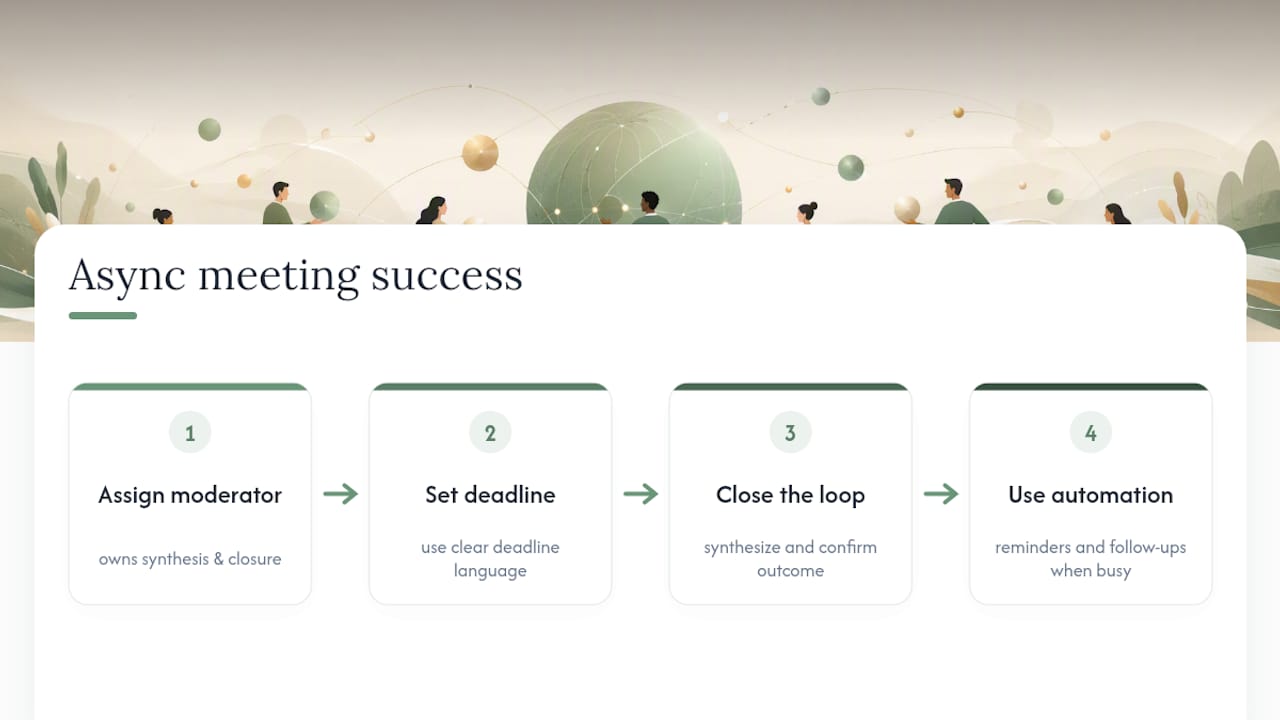
Teams that fail at async almost always skipped the moderator role, not the deadline. A deadline without someone accountable for synthesis just becomes a deadline for silence. That’s the part most advice glosses over in favor of talking about tools.
The other overrated fix is picking a better platform. The format matters more than the app. A team with a mediocre tool and a disciplined moderator will outperform a team with a great tool and no one closing the loop, every time.
If you’re starting from zero, prioritize the moderator assignment and the deadline language before you touch templates or tools. Get those two right, and the rest is furniture. Automation, like the reminder and follow-up handling built into Otto, matters most as a way to keep that discipline from falling apart when the moderator gets busy, not as a replacement for the discipline itself.
— Eddie
Sources
- GitLab handbook — async updates
- Harvard Business School Online — Managing remote employees
- Timeeting — What is an async meeting?
- Read AI — Async update guide