 Otto
Otto5 Step Email Follow Ups for Busy Founders: Stop on Reply
5 Step Email Follow Ups for Busy Founders: Stop on Reply

Automate multi-step follow-ups that stop the moment someone replies, use behavior and time triggers instead of guesswork, and route everything through a system that syncs with your calendar and CRM. Set it up once with time-zone-aware sending and stop-on-reply logic active, and you’re covered. Below is a copyable 5-step sequence, the exact triggers to use, and a setup checklist to get it running today.
TL;DR:
- Automated follow-ups should utilize behavior triggers like clicks, replies, and calendar bookings to adapt in real-time and avoid spamming contacts.
- The recommended five-step sequence spans roughly three weeks, with each message serving a distinct purpose such as initial contact, value sharing, or a breakup note.
- Proper setup requires verifying email authentication, connecting CRM and calendar, and enabling time-zone-aware sending to maximize deliverability and response rates.
- Tracking reply, open, click, unsubscribe, and complaint rates helps refine the sequence and maintain a healthy sender reputation.
- Stop-on-reply and approval workflows are critical to prevent sending irrelevant messages and to catch errors before reaching contacts.
Table of Contents
- What Automated Follow-Ups Do and Where They Fit In Your Workflow
- A 5-Step Follow-Up Sequence You Can Copy Today
- Triggers and Automation Rules That Keep You Relevant
- Setup Checklist: Identities, Deliverability, Integrations, Templates, and Approvals
- Measure and Iterate: Metrics, A/B Tests, and Deliverability Signals
- Where Automated Sequences Actually Break Down
- Automate Email Follow-Ups: Practical Sequences for Busy Founders
- How Otto Handles the Follow-Up Checklist
- Sources
- FAQ
What Automated Follow-Ups Do and Where They Fit In Your Workflow
An automated follow-up system runs a predefined sequence of emails on a schedule, then adjusts or halts based on what the recipient does. Three concepts make it work: a sequence (the ordered set of messages), a trigger (the event that fires the next step, like a click or a missed open), and stop-on-reply logic (the rule that kills every remaining step the second the person responds). Threading matters too. Replies that stay inside the original conversation thread preserve context far better than a fresh subject line every time, and threaded follow-ups generally outperform disconnected new-subject emails for most outreach.
The payoff is straightforward: fewer dropped conversations, more replies, and hours back in your week that used to go to manual “just checking in” emails. This shows up most in three places:
- Cold outreach to prospects who haven’t responded to a first pitch.
- Nurture sequences for leads who downloaded something or asked a question but went quiet.
- Appointment reminders and confirmations that need to fire without anyone remembering to send them.
Most cold-email replies actually come from the follow-ups, not the opener. Campaigns that skip follow-up entirely leave the majority of possible replies on the table.
A 5-Step Follow-Up Sequence You Can Copy Today
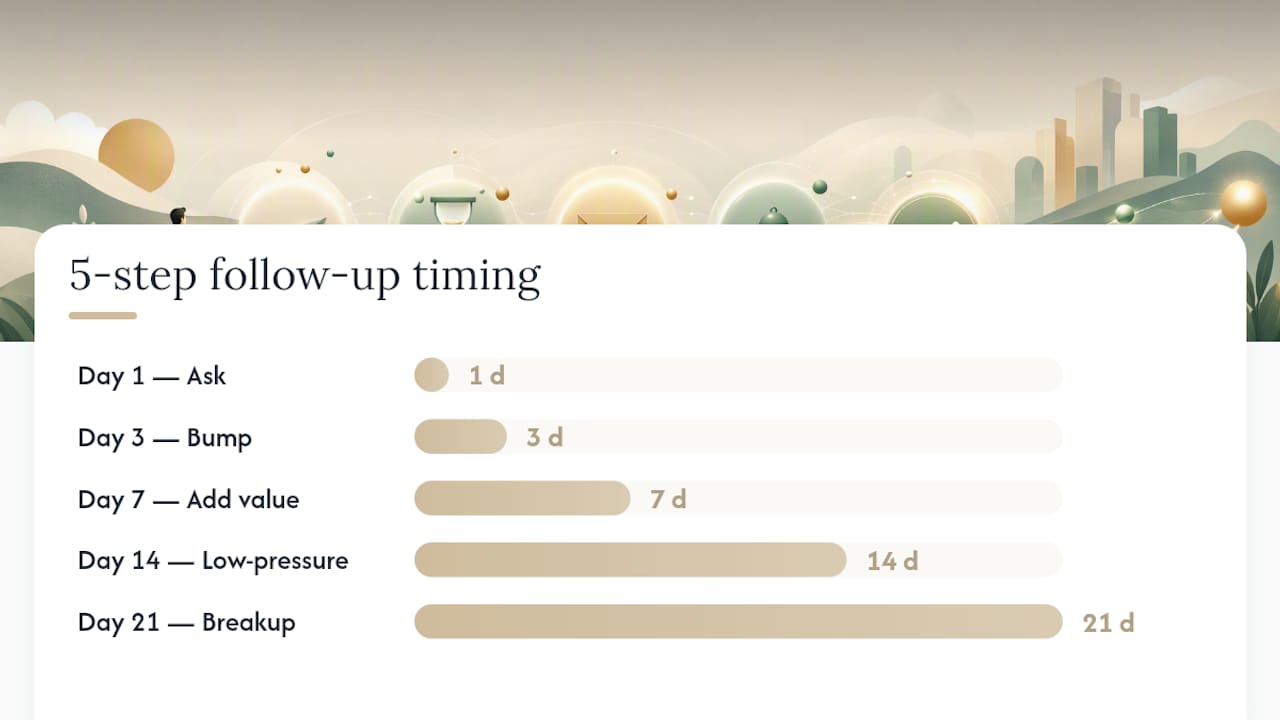
A 5-step sequence spread across roughly three weeks is one of the most consistently effective structures for outbound and nurture campaigns alike. The key rule: each message needs a distinct job. Repeating “just following up” five times in a row is the fastest way to get ignored or reported.
Here’s the cadence:
- Day 1, initial message. State your ask clearly in two or three sentences. One CTA, no attachments unless requested. Keep it under 100 words.
- Day 3, the bump. Short and light: “Wanted to make sure this didn’t get buried. Any thoughts?” Thread it in the same conversation. Under 40 words.
- Day 7, add value. Share something useful, a relevant resource, a case study, a specific insight tied to their situation. This is the message that earns a reply from people who ignored the first two.
- Day 14, low-pressure check. Lower the stakes: “Not the right time? Happy to circle back later.” This filters out dead leads without burning the relationship.
- Day 21, the breakup. Signal you’re closing the loop: “I’ll assume the timing isn’t right and won’t follow up again unless I hear from you.” This message alone often produces a burst of replies from people who meant to respond and never got around to it.
For warm contacts, referrals, or existing customers, compress this to three touches over ten days. They already know you, so the “add value” and “breakup” steps can merge into one message.
Pro Tip: Thread steps 1 through 4 in the same email conversation, but consider starting a fresh subject line on the breakup message. A new subject signals urgency and often gets opened even by people who’ve been ignoring the thread.
Triggers and Automation Rules That Keep You Relevant
The difference between a helpful sequence and a spam complaint usually comes down to the triggers behind it. Good automation reacts to what the recipient actually does, not just the calendar.
Practical triggers worth building into any sequence:
- Open without click: send a lighter nudge, not the full next step.
- Link click: move the contact into a faster, more direct flow since they showed intent.
- Form submission: trigger an immediate, personalized reply rather than waiting for the next scheduled slot.
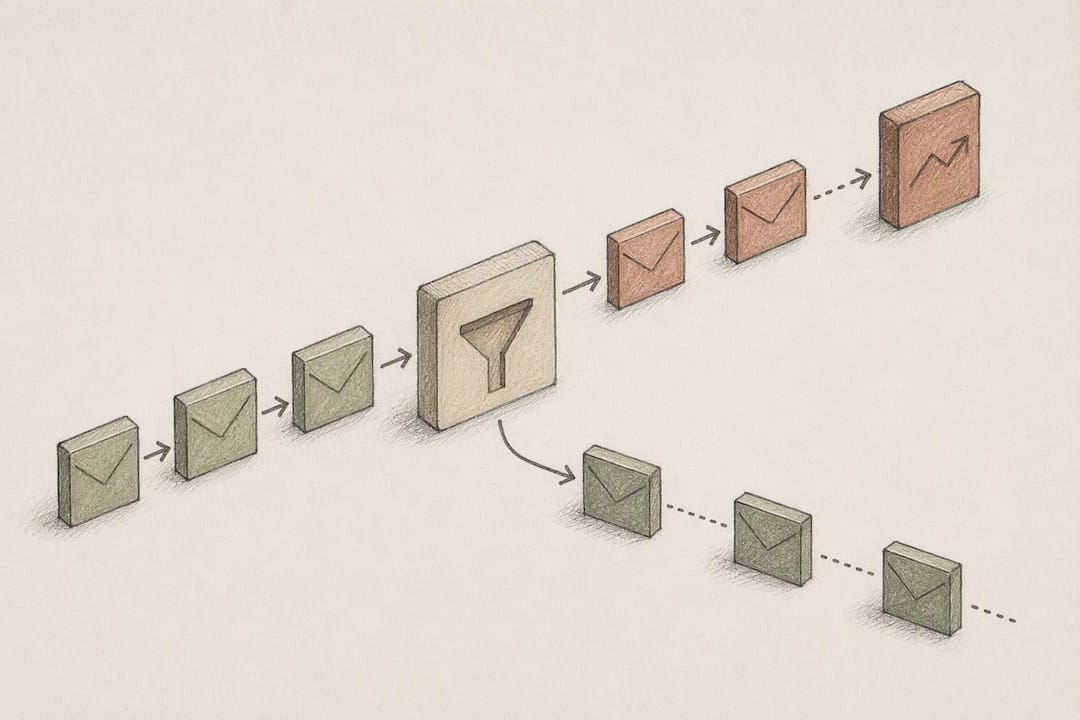
- Reply of any kind: stop every remaining step in the sequence instantly.
- Calendar event booked: cancel outreach and switch to a confirmation and reminder track.
Stop-on-reply and behavior-based triggers together tend to produce better response rates than fixed-interval blasts that ignore recipient behavior entirely. Auto-stop and opt-out handling aren’t optional extras. A contact who unsubscribes or replies “not interested” needs to exit every active sequence immediately, not just the one that triggered the request.
Branching logic pays off here too. A lead who clicks a pricing link should move into a sales-focused flow, while one who only opens emails without engaging stays in a slower nurture track.
Setup Checklist: Identities, Deliverability, Integrations, Templates, and Approvals
Before you turn on any sequence, run through the technical groundwork. Skipping this step is the most common reason automated emails land in spam instead of inboxes.
- Verify sending authentication. Confirm SPF, DKIM, and DMARC records are properly configured for your domain before sending any volume.
- Choose your sending method. Decide whether messages go out from your actual inbox (better for cold outreach, feels personal) or a dedicated platform sending domain (better for high volume).
- Connect your CRM and calendar. Sync contact records and meeting data so follow-ups reflect real status, not stale information.
- Enable time-zone-aware sending. Delivering during a recipient’s local business hours instead of a fixed UTC time can meaningfully lift open rates.
- Clean your contact list. Remove bounced and invalid addresses before launch, not after your first complaint.
- Build a template library. Write reusable versions of each of the five steps so you’re not drafting from scratch every campaign.
- Set daily send caps. New domains especially need gradual ramp-up, not a sudden burst of hundreds of emails.
- Run test sends. Send the full sequence to yourself and a colleague before it touches a real contact list.
- Set an approval workflow. Route drafted messages through a review step until you trust the system to send unsupervised.
Pro Tip: Start every new sequence in “remind me before sending” mode rather than full automation. It costs you a few extra clicks in week one, but it catches the awkward personalization errors and mistimed sends before they reach a real contact.
Measure and Iterate: Metrics, A/B Tests, and Deliverability Signals
Reply rate is the metric that actually matters. Open and click rates tell you whether people saw the message, but reply rate tells you whether the sequence is doing its job.
Track these on every campaign:
- Reply rate (primary success metric)
- Open rate (deliverability and subject-line signal)
- Click rate (content and CTA signal)
- Unsubscribe rate (relevance signal)
- Spam complaint rate (sender reputation signal, watch closely)
Running an A/B test on subject lines or send timing works best with a sample of at least around 200 sends per variant before drawing conclusions. Smaller batches produce noise, not signal.
For deliverability, tracking bounce and complaint rates while removing non-deliverable addresses protects your sender reputation over time. Throttle volume on new domains, and if complaint rates start climbing, pause the sequence and check your list quality before sending another batch.
Where Automated Sequences Actually Break Down
The most common mistake is sending the same “checking in” message five times instead of five distinct messages. The second is ignoring recipient time zones. Third, and most damaging, is a delayed stop-on-reply setting that lets a fourth follow-up land after someone already answered.
Approval-based sending catches most of these before they cause damage. Daily send caps prevent a stale list from triggering a complaint spike overnight. And when a sequence needs context from an earlier meeting or a promise made on a call, an integrated system like Otto pulls that detail automatically instead of forcing you to dig through old notes.
Automate Email Follow-Ups: Practical Sequences for Busy Founders
The advice you’ll find most often online treats follow-up automation as a volume problem: send more touches, wait longer, hope something lands. That’s backwards. The sequence in this article works because each message has a distinct job, not because it has five steps. A three-step sequence with real value in the middle beats a seven-step sequence that repeats itself.
The bigger gap in conventional advice is stop logic. Most guides mention it as a footnote when it should be the first thing you configure. A sequence that keeps emailing someone after they’ve replied doesn’t just look sloppy, it actively damages trust you spent effort building.
If you’re starting from zero, prioritize in this order: get stop-on-reply working correctly, build the 5-step sequence with genuinely different messages at each stage, then worry about A/B testing subject lines. Testing optimizes a system that already works. It won’t fix one that’s fundamentally annoying people.
— Eddie
How Otto Handles the Follow-Up Checklist
This solution is built exactly for the checklist above: inbox and calendar integration, stop-on-reply logic that fires the instant a contact responds, and approval-based sending so nothing goes out without your sign-off. It also tracks promises made in meetings and calls, allowing a follow-up sequence to pull in context you’d otherwise have to dig up manually, what you committed to, when, and to whom.

This fits founders, operators, and chiefs of staff juggling too many threads across too many tools, the people who end up being the human glue between their inbox, calendar, and CRM. If that’s you, start by connecting your inbox and calendar to Otto and running one sequence in approval mode before switching it to full automation. You’ll see exactly what it catches before you ever trust it to send unsupervised.
Sources
For sequence timing and cadence design, see the 5-email cadence guide. For deliverability and automation feature breakdowns, see EmailToolTester’s automation overview. For copy generation, the AI follow-up email generator is worth a look, and for broader SMB automation setup, this marketing automation checklist covers adjacent ground.
FAQ
How Can I Automate Follow-Up Emails in Outlook?
Outlook supports basic rules and delayed sends through its native scheduling tools, but multi-step sequences with stop-on-reply logic typically require a connected automation tool or an integrated assistant like Otto that syncs with your calendar.
What Is the 30/30/50 Rule for Cold Emails?
There’s no single standardized definition of any particular numeric “rule” in cold email practice, so treat any specific breakdown you see with caution. If it appears on a source, it likely refers to splitting effort across subject line, opening line, and offer, but this isn’t a universally agreed framework.
Is It Possible to Set Up an Automatic Reply for Email?
Yes. Most email platforms let you configure an automatic reply for incoming messages, and automation platforms take it further by triggering a sequence of follow-ups based on whether the recipient opens, clicks, or replies.
How Do I Automate Follow-Up Emails in Gmail?
Gmail’s native tools handle simple scheduled sends and canned responses, but for a full sequence with triggers and stop-on-reply behavior, you need a connected automation layer or an assistant that reads your inbox directly, which is where a tool like Otto fits in.
How Many Follow-Ups Should a Sequence Include?
Five touches spread over about 21 days is a commonly recommended structure, though warm contacts and referrals often only need three touches over ten days.