 Otto
OttoTrigger Driven Client Communication Plan for Agencies: 7 Sections
Trigger Driven Client Communication Plan for Agencies: 7 Sections

A client communication plan is a one-page document that names who talks to whom, on which channel, on what schedule, and who owns each promise until it closes. The single most useful thing you can do this week is fill out that one page and hand it to the client at kickoff. Skip the strategy deck. Start with the page, then let triggers, not the calendar, drive most updates.
TL;DR:
- A client communication plan should specify who talks to whom, on what channel, and how often, with escalation paths clear for potential issues.
- Mapping and scoring stakeholders based on influence and interest is crucial to tailoring appropriate channels and update cadences for each engagement.
- Trigger-based updates, rather than fixed calendar schedules, ensure communication is reactive to project events like delays or scope changes, improving response time.
- Automating reminders, follow-ups, and escalation scripts with a dedicated tool reduces missed commitments and helps maintain accountability across the team.
- Regular feedback and review checkpoints, especially quarterly, prevent plan obsolescence and help adapt communication to evolving client needs and risks.
Table of Contents
- What Is a Client Communication Plan, and How Is It Different From a Strategy?
- Why a Client Communication Plan Protects Revenue, Not Just Relationships
- How to Build a Client Communication Plan Step by Step
- Copy-and-Use Templates for Your One-Page Plan
- Which Tools Actually Scale a Client Communication Plan?
- How Do You Know if the Plan Is Working?
- The Mistakes That Turn a Plan Into a Fire Drill
- How an AI Chief of Staff Closes the Gaps a Plan Leaves Open
- How to Set Communication Objectives That Actually Match What the Client Needs
- Adjusting Your Communication Style for Different Client Personas
- Managing the Risk When Communication Actually Breaks Down
- Turning Client Feedback Into a Living, Revised Plan
- Legal and Compliance Considerations Your Plan Shouldn’t Skip
- A 30/60/90 Rollout: Building the Habit, Not Just the Document
- Otto: An Automation Layer That Backs Up the Plan You Just Built
- A Few Resources Worth Bookmarking
- Sources
What Is a Client Communication Plan, and How Is It Different From a Strategy?
A client communication plan is tactical: it names who, what, when, and how for one engagement. A communication strategy is the north star behind it: purpose, audience, key messages, and intended outcomes across an entire organization. The Glasscock School’s framework lists purpose, audiences, context, outcomes, key messages, medium, and messenger as the ingredients of a working strategy. A plan takes those ingredients and turns them into a checklist for one client, one project, or one retainer.
Use a strategy when you’re setting communication policy across a firm or department. Use a plan when you’re onboarding a specific client next Tuesday and need to know who calls whom if the deliverable slips. Most client-facing work only needs the plan. FranklinCovey’s communication guidance notes that strategic communication should build shared understanding, not just move information, and a plan is where that intent becomes a habit.
A one-page format wins on adoption because nobody rereads a fifteen-page policy before a Tuesday call. They will glance at one page taped inside a project folder.
Why a Client Communication Plan Protects Revenue, Not Just Relationships
Every unscoped request that lands in the wrong channel eventually becomes unpaid work. Channel rules, like “scope changes go through email, not Slack,” give you a paper trail when a client claims something was “just a quick ask.” That paper trail is what turns a billing conversation from an argument into a formality.
Predictable cadence changes how clients feel about you long before it changes what they pay you. A client who gets a Friday status update every week stops calling on Wednesday to check in, because they already know Friday is coming. AgencyPro’s research on agency communication ties a documented cadence and a published escalation path directly to lower churn.
The engagements that benefit most are the ones with multiple stakeholders on the client side, recurring retainers where memory fades between touchpoints, and any project where scope tends to drift. A single freelance gig with one point of contact needs less structure. A retainer with a marketing director, a finance approver, and a legal reviewer needs the whole page.
How to Build a Client Communication Plan Step by Step
Start with the people, not the tools. Everything downstream, channels, cadence, escalation, depends on knowing who actually needs to hear from you and how often.
1. Map and score your stakeholders
List everyone touched by the engagement, then score each person on two axes: influence over the decision and interest in the day-to-day details. A finance approver might have high influence and low interest, meaning they want the invoice summary, not the daily standup notes. A project lead usually scores high on both.
Label each stakeholder as primary (your default point of contact) or secondary (looped in for specific triggers, like budget changes or timeline shifts). Creately’s mapping approach treats this visually, almost like an org chart layered onto a project timeline, which helps on multi-stakeholder accounts where the hierarchy isn’t obvious from a contract.
For each stakeholder, capture:
- Full name, title, and direct contact info
- Preferred channel (email, Slack, phone) and time zone
- Decision rights (can they approve spend, or do they just relay information?)
- Escalation tier (do problems go to them first, or straight to their boss?)
2. Set channel rules by message type
Pick one channel per message category and stick to it, because inconsistency is what makes clients start guessing where to send urgent requests. A reasonable default:
- Formal decisions and scope changes go through email, always, so there’s a dated record.
- Day-to-day status and quick questions go through Slack Connect or a shared portal.
- Urgent, time-sensitive issues go through a phone call or a same-day video call, followed by an email recap.
- Recurring reports live in a project management tool or client portal as the single source of truth, so nobody’s digging through email threads for the latest file.
The single-source-of-truth principle matters more than the specific tool. Pick one place where the “current” version of a document lives, and never let a second version circulate over email.
3. Build cadence templates by engagement type
Cadence should match the engagement, not a company-wide default. A rough starting framework:
| Engagement type | Update frequency | Primary format |
|---|---|---|
| Onboarding (first 30 days) | Weekly | Email summary + one live call |
| Active project | Twice weekly | Async status in portal |
| Ongoing retainer | Weekly | Friday recap email |
| Strategic account | Monthly + quarterly | QBR deck + monthly health check |
4. Define triggers, not just calendar dates
Calendar-only updates are the laziest version of a communication plan, and they miss the moments that actually matter. A trigger list catches events as they happen: a missed deadline, a budget overrun past a set threshold, a scope change request, a new stakeholder joining the account. Upbase’s plan template research found that trigger-driven updates tend to move work faster than fixed-schedule updates, because they tie communication to actual progress instead of an arbitrary date on a calendar.
Build a short trigger table: event, required action, who gets notified. That table becomes the backbone of your escalation paths.
5. Assign ownership: one name per responsibility
Every responsibility on the plan needs exactly one owner’s name next to it, not a team or department. “Marketing team” is not an owner. “Sarah, weekly status email” is. Include a backup name for vacations and turnover, and update the roster the day someone leaves the account.
6. Write escalation paths and scripts in advance
Decide the if-then logic before you need it under pressure:
- If a deliverable is 48 hours late, the account owner emails the primary contact with a revised date and reason.
- If feedback is overdue by more than five business days, the account owner escalates to the secondary contact with a direct ask for a decision date.
- If a client threatens to churn, the account owner loops in leadership within 24 hours.
Pro Tip: Write the actual sentences for your two or three most common escalation scenarios now, while you’re calm. A pre-written script for “we’re going to miss the deadline” reads far more composed than anything you’ll draft in the moment.
7. Draft your status update and recap templates
A status update template that takes thirty seconds to fill out gets used every week. One that takes fifteen minutes gets skipped the first time someone’s busy. Keep it to three lines: what got done, what’s next, what you need from the client.
Copy-and-Use Templates for Your One-Page Plan
Your one-page plan needs seven sections, and each should take under two minutes to fill once you’ve done the stakeholder mapping above: project basics, stakeholder roster, channel rules, cadence, trigger table, ownership list, and escalation path. Upbase’s template structure covers this same set of fields and can be filled quickly once the groundwork is done.
Status update template (use every cycle):
- Done: what shipped or got approved since the last update
- Next: what’s in progress and the expected date
- Need: any decision, asset, or approval you’re waiting on from the client
Trigger table example:
| Event | Action | Who’s notified |
|---|---|---|
| Deliverable delayed 48+ hours | Send revised timeline with reason | Primary contact |
| Budget approaches 80% of scope | Flag in writing before spending more | Primary + finance approver |
| New stakeholder added | Send onboarding recap and channel rules | New stakeholder + secondary contact |
| Feedback overdue 5+ business days | Escalation email with decision deadline | Primary contact |
Escalation script for overdue feedback:
“Hi [name], we’re still waiting on approval for [deliverable], which we sent on [date]. To keep your project on track, we need a decision by [date]. If timing’s tight on your end, let us know and we’ll adjust the plan together.”
That last line matters. It offers a path forward instead of just flagging the problem.
Which Tools Actually Scale a Client Communication Plan?
A plan on paper works for one client. A plan that has to run across forty clients needs software doing the enforcement, because no one remembers forty separate cadences by hand.
Pick one tool per job instead of layering five apps that all claim to do everything:
- Project management tool (Asana, Monday, ClickUp) as the single source of truth for deliverables and status.
- Client portal or shared drive for approvals and formal sign-off, so nothing lives only in a private inbox.
- Slack Connect for day-to-day operational back-and-forth with teams that already use Slack internally.
- Email for anything formal: contract changes, scope decisions, anything you’d want a timestamp on later.
A CRM is what makes segmentation possible at scale. CRM Beat’s research on CRM-driven communication plans recommends segmenting clients by value and lifecycle stage, then giving each tier a different cadence: Platinum accounts might get weekly calls and a dedicated Slack channel, Gold accounts get biweekly async updates, Silver and Bronze accounts run on a lighter monthly touch plus automated triggers. That segmentation keeps you from over-servicing a small account at the expense of a large one.
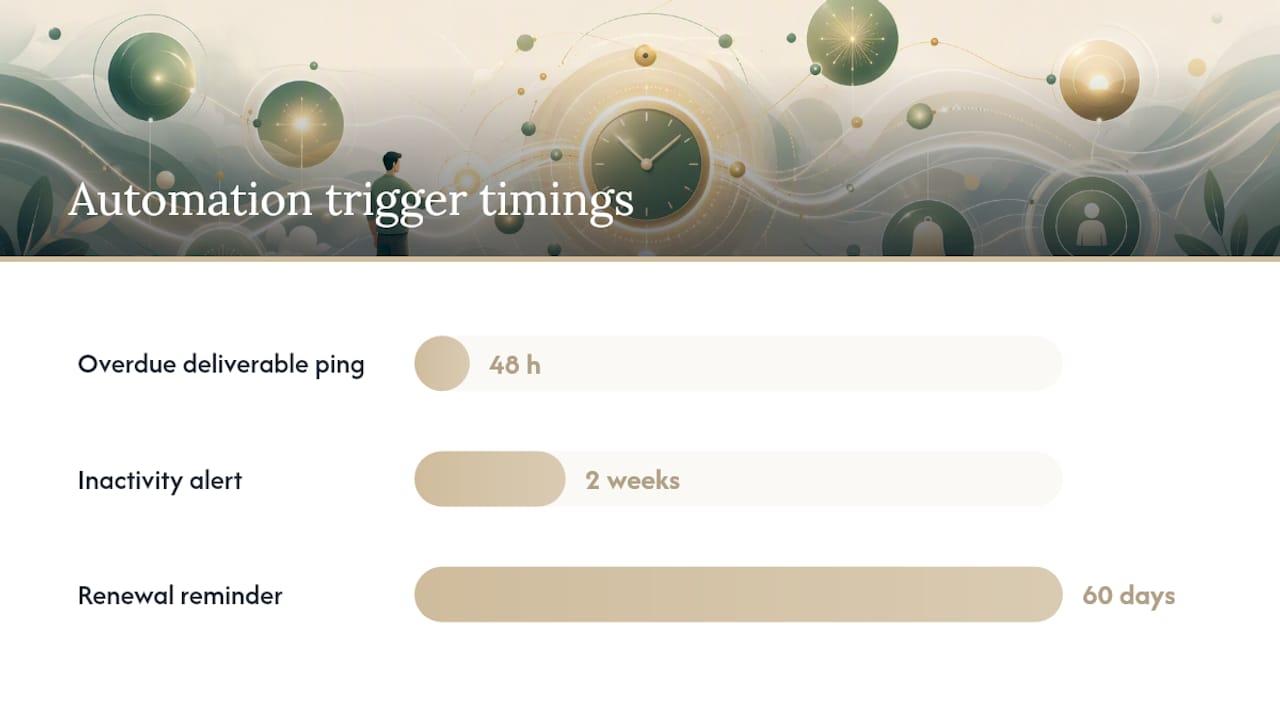
Automation recipes worth setting up early: a welcome sequence that fires the moment a contract is signed, an inactivity alert if a client hasn’t opened a status update in two weeks, a renewal reminder sixty days before contract end, and a trigger notification that pings the account owner the moment a deliverable hits 48 hours overdue. Start with two integrations, not ten. A CRM connected to your project tool and one automation for onboarding will do more for adoption than a fully wired stack nobody maintains.
How Do You Know if the Plan Is Working?
You need a small number of numbers you actually check, not a dashboard nobody opens. Track response rate (how many status updates get a reply within 48 hours), time-to-approval on decisions, how often clients go off-channel with urgent requests, and retention at renewal time.
Set SLAs during onboarding, in writing, so nobody’s guessing later:
- Email replies within one business day
- Urgent Slack messages acknowledged within four business hours
- Formal proposals or scope changes get a decision within five business days
Build review checkpoints into the calendar from day one: a kickoff review in week one, a midpoint check at the project’s halfway mark, a monthly health check on retainers, and a quarterly business review for strategic accounts. Off-channel requests are one of the more telling numbers here, since a rising count usually means your channel rules from earlier aren’t sticking and clients have quietly reverted to whatever’s fastest for them.
When a metric slips, change one variable on the plan, not the whole document. If time-to-approval keeps blowing past five days, add a reminder trigger at day three instead of rewriting the entire escalation section.
The Mistakes That Turn a Plan Into a Fire Drill
Most broken communication plans share the same handful of root causes. No single source of truth means the client and your team are working off two different “latest” versions of a file. Inconsistent cadence means a client gets weekly updates for a month, then silence, then panic. Missing ownership means a request sits in limbo because three people assumed someone else had it.
Watch for these red flags before they become a crisis:
- Clients start going off-channel because your official channel feels slow or ignored.
- Feedback arrives later each cycle, a slow drift rather than one bad week.
- The same question gets asked twice because nobody’s tracking what was already answered.
Scripts for the conversations you dread:
- Scope creep: “This request falls outside what we scoped in [document]. We’re glad to take it on, here’s what it adds to the timeline and budget.”
- Missed deadline: “We’re not going to hit [date]. Here’s why, here’s the revised date, and here’s what we’re doing differently to hit it.”
- Bad news: “The result came back lower than we hoped. Here’s what happened, and here’s the adjustment we’re recommending.”
- Fee increase: “Starting [date], our rate is adjusting to [amount] to reflect [reason]. Your current scope and deliverables stay the same.”
After any hard conversation, close the loop: confirm the outcome in writing, update the plan if the incident revealed a gap, and note the resolution date so nobody reopens a settled issue three weeks later.
How an AI Chief of Staff Closes the Gaps a Plan Leaves Open
A plan tells you what should happen. It doesn’t stop a promise made on a call from vanishing the moment the call ends. That’s the actual failure mode behind most missed follow-ups: not a bad plan, but a verbal commitment nobody wrote down because it happened in a meeting your inbox never saw.
An AI chief of staff like Otto sits across email, calendar, and meetings at once, so it catches commitments wherever they’re made and holds them in one ledger until they close. That matters most for the trigger list from the plan above: a promise made on a client call becomes a tracked item automatically, with an owner attached, instead of relying on someone’s memory or a hastily typed note.
- It flags an overdue promise before the client has to ask about it.
- It drafts the follow-up or recap so the owner reviews and sends, rather than starting from a blank page.
- It nudges the named owner from the roster, not a generic team inbox.
Pro Tip: Run your plan and your tools in parallel for the first month. The plan defines who owns what; the assistant makes sure nothing owned quietly falls through.
Nothing goes out without a human approving it first. The plan stays the source of accountability. The tool just makes sure fewer things fall through the parts of the process a document can’t watch.
How to Set Communication Objectives That Actually Match What the Client Needs
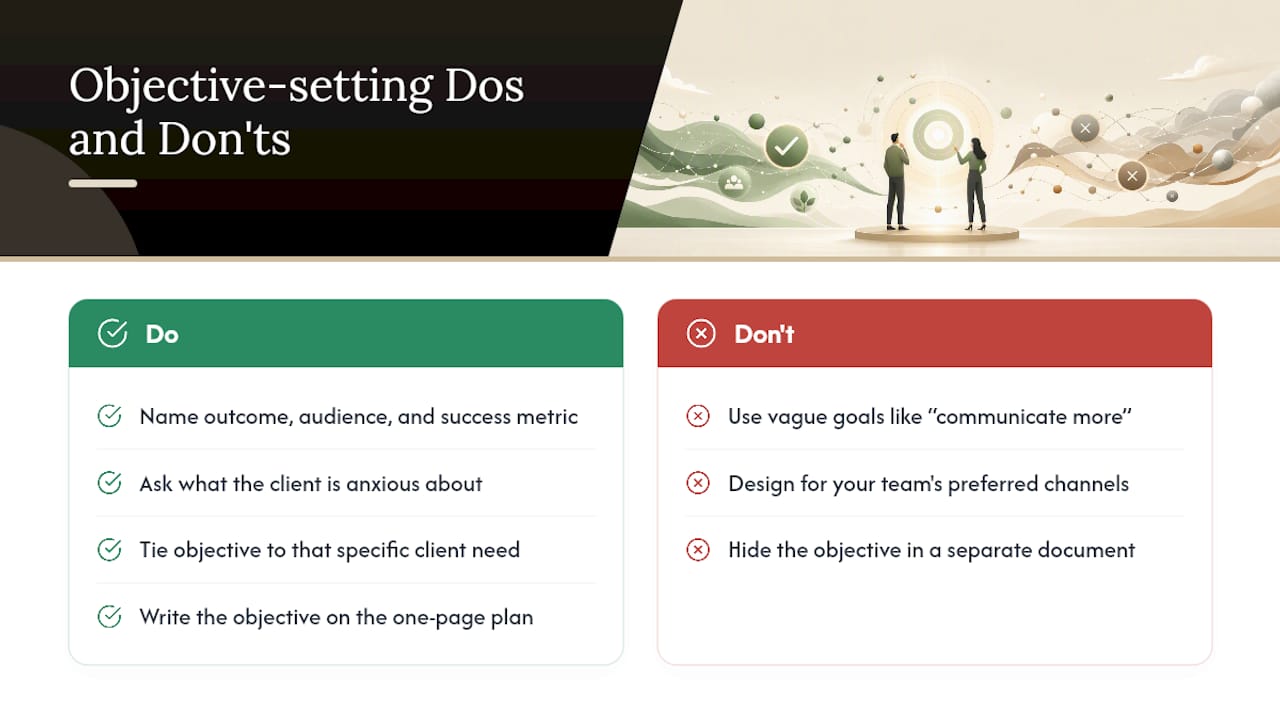
A generic objective like “communicate more” gives your team nothing to act on. A real objective names the outcome, the audience, and how you’ll know it worked: “Reduce off-channel requests from the marketing director by routing all urgent asks through Slack within two weeks of kickoff” is something you can actually check.
Start by asking what the client is actually anxious about. A client burned by a previous vendor who “went dark” for weeks needs an objective built around visibility: guaranteed weekly touchpoints, even when there’s nothing new to report. A client drowning in internal meetings needs the opposite: fewer, denser updates instead of frequent short ones.
Tie every objective to a specific client need, not a company preference. If your team likes long-form written updates but the client’s decision-maker only reads Slack on their phone between meetings, the objective has to bend toward the client’s reality, not your team’s habits. Shopify’s communication strategy framework treats objectives as one layer above channels and messaging precisely for this reason: get the objective wrong and every tactic built on top of it misses.
Write the objective down on the one-page plan itself, not in a separate strategy document nobody revisits. When a new team member takes over the account, that single sentence should tell them what “good” looks like for this specific client, without a briefing call.
Adjusting Your Communication Style for Different Client Personas
The same update, sent the same way, lands completely differently depending on who’s reading it. A founder juggling six vendors wants three sentences and a clear ask. A committee-driven enterprise client wants documentation thorough enough to survive being forwarded to five people who weren’t on the call.
Rough personas worth building into your stakeholder map:
- The delegator: wants outcomes, not process. Give them the headline and let them ask follow-up questions if they want detail.
- The details person: wants the full trail, dates, decisions, and reasoning. Underserving this person creates anxiety even when the work is fine.
- The committee client: decisions move through multiple approvers, so updates need to be self-contained enough to circulate without you in the room.
- The anxious first-timer: newer to outsourcing this kind of work, needs more frequent reassurance early, tapering as trust builds.
None of these personas are fixed forever. A client who started as an anxious first-timer often relaxes into a delegator after two or three clean project cycles, and your cadence should relax with them. Note the persona on the client profile section of your plan and revisit it at each quarterly review, because misreading a shift, treating a now-confident client like they still need daily hand-holding, reads as smothering rather than attentive.
Managing the Risk When Communication Actually Breaks Down
Every plan eventually fails somewhere: a message gets missed, a promise slips, a client hears about a problem from someone other than you first. The plan’s real job isn’t preventing every failure. It’s making failures small, contained, and fast to recover from instead of letting them compound.
Build risk management into the plan itself with a short pre-mortem: what’s the worst likely communication failure on this account, and what’s the recovery step? For a client with a history of scope disputes, the risk is an unrecorded verbal agreement, so the mitigation is a hard rule that every verbal decision gets a same-day email recap. For a client juggling multiple vendors, the risk is a message getting buried, so the mitigation is a confirmed-read requirement on anything time-sensitive.
When a failure happens anyway, the sequence matters more than the apology. Acknowledge the gap specifically, without over-explaining internal reasons the client didn’t ask for. State the fix and the date it takes effect. Then update the plan’s trigger table so the same failure type gets caught earlier next time. A communication breakdown that produces a permanent process fix reads, oddly, as more reassuring to a client than a project that never had a hiccup at all, because it proves the system learns.
Turning Client Feedback Into a Living, Revised Plan
A communication plan that never changes after the kickoff call is a plan that’s slowly going stale. Client needs shift: a stakeholder leaves, priorities change, a channel that worked in month one starts feeling clunky by month four.
Build a lightweight feedback loop instead of waiting for a client to complain. Ask directly at the monthly health check: is the cadence still right, is the channel mix still working, is anyone on their side feeling out of the loop? A thirty-second answer to those three questions surfaces most of the friction before it becomes a churn risk.
When feedback comes in, log it against a specific section of the plan rather than treating it as a vague complaint. “Cadence feels too frequent” points at the cadence table. “We’re missing decisions in email threads” points at channel rules. Update that section, note the change date, and mention the update back to the client so they see their input actually moved something.
Quarterly business reviews are the natural checkpoint for larger revisions, since that’s when both sides usually have enough distance to spot patterns instead of reacting to one bad week. A plan revised on real feedback, four times a year, tends to age far better than one drafted once at kickoff and never touched again.
Legal and Compliance Considerations Your Plan Shouldn’t Skip
Client communication isn’t just a relationship exercise. Certain records carry legal weight, and your plan should reflect that from the start rather than after a dispute forces the issue.
Formal decisions, scope changes, and fee agreements belong in a channel that creates a timestamped, retrievable record, which is exactly why email works better than Slack for anything contractual. A verbal agreement on a call, confirmed only by memory, is far weaker evidence than a same-day recap email the client didn’t dispute.
Data privacy rules matter too, especially for client work involving personal information, financial details, or regulated industries like healthcare and finance. Know which channels are appropriate for sharing sensitive material, and build that into your channel rules rather than leaving it to individual judgment in the moment. A client portal with access controls is usually safer for sensitive documents than an email attachment that can be forwarded indefinitely.
Retention policies deserve a line in the plan as well: how long do you keep communication records, and who’s responsible for archiving them when an engagement ends? This matters most for regulated industries and for any client relationship that could plausibly end in a dispute. None of this needs to turn your plan into a legal document. It just needs one section noting which communications require a written record and how long those records get kept.
A 30/60/90 Rollout: Building the Habit, Not Just the Document
The plan fails if it’s a document nobody opens after week one. Treat the first ninety days as the real test of whether it sticks.
Days 1 to 30: audit every existing client touchpoint, pick or build one usable one-page template, and set SLAs on your two or three biggest accounts immediately.
Days 31 to 60: automate the onboarding sequence for new clients, train the team on channel rules and escalation scripts, and pilot the full plan on two or three real accounts before rolling it out everywhere.
Days 61 to 90: review the KPIs from the pilot, publish a quarterly business review cadence, embed the escalation paths into your project tool, and scale the template across the rest of the client roster.
The behavioral trick that actually makes this stick: tie the plan to something the team already does weekly, like a Friday status email, instead of asking people to remember a new standalone habit.
— Eddie
Otto: An Automation Layer That Backs Up the Plan You Just Built
An AI assistant is an alternative to hiring another coordinator for the follow-up work your plan demands. Once your channel rules and triggers exist on paper, Otto reads across email, calendar, and meetings to catch the commitments that fall between those channels, the kind a static template can define but can’t chase on its own.

If you sat through the stakeholder mapping and escalation-script sections above and thought “who’s actually going to enforce this every week,” that’s the exact gap Otto is built to close. It can listen in meetings, track promises made out loud, and draft the recap or follow-up so the named owner from your roster just has to review and approve, never guess what was agreed. Nothing sends without that approval. The plan still decides who owns what and when escalation kicks in. Such an assistant helps ensure fewer of those commitments get lost between the tools you’re already using.
If you’re deciding between tightening your process first or adding automation now, the honest answer is both move together: a plan without enforcement drifts, and automation without a plan has nothing to enforce. Start with your one-page template, then see what Otto picks up in week one.
A Few Resources Worth Bookmarking
For deeper templates and framework detail: Upbase’s plan template, Glasscock School’s strategy elements, and 1SMTG’s client communication examples for scripting hard conversations.