 Otto
OttoClient Follow-Up System: What Actually Converts in 2026
Client Follow-Up System: What Actually Converts in 2026

If you want fewer dropped commitments and more closed deals, put your follow-ups on a system, not a memory. The fastest fix: capture every commitment the second it’s made, enroll the client in a four-touch sequence over 14 to 21 days, and automate the logging and reply routing so nothing sits in a forgotten inbox. Otto is built around exactly that loop, centralizing tasks and messages so a promise made on a call doesn’t die in someone’s notes app.
Here’s the one-hour version:
- Capture the commitment immediately. Log the promise (a quote, a callback, a proposal) the moment it’s made, tied to a date and a next action.
- Enroll in a four-touch sequence. Space it over 14 to 21 days with a different purpose behind each message.
- Automate logging and reply routing. Every reply pauses the sequence and routes to a human, no exceptions.
Do this and watch two numbers: reply rate and quote-to-customer conversion. Most teams see movement on both within the first two weeks, simply because fewer commitments fall through unnoticed.
Key Takeaways
A client follow-up system built around a four-touch cadence, automated logging, and human-approved messaging converts more deals and loses fewer commitments than ad hoc outreach ever will.
| Point | Details |
|---|---|
| Start with quote follow-up | Build a four-touch sequence over 14 to 21 days as your highest-ROI starting sequence. |
| Vary timing and message purpose | Uneven send times and distinct touch purposes prevent the sequence from feeling automated. |
| Protect deliverability first | Authenticate your domain and warm it up before scaling send volume or adding SMS. |
| Pilot before full rollout | Test triggers and reply-parsing on a small contact group before enrolling your full list. |
| Otto centralizes the workflow | Otto logs commitments from Gmail and calendar activity and drafts follow-ups for your approval before anything sends. |
Table of Contents
- What Is a Client Follow-Up System, and Why Does It Matter?
- What Features Should a Follow-Up System Include?
- How Do You Build a Follow-Up Cadence That Converts?
- Which Channel Fits Each Touch in Your Sequence?
- What Triggers and Exit Rules Keep Automation Accurate?
- What Deliverability and Compliance Basics Should You Check First?
- How Do You Choose the Right Follow-Up System?
- What Does a 30-Day Rollout of a Follow-Up System Look Like?
- How Does Otto Address the Common Follow-Up Failure Points?
- Where Should a Small Team Focus First?
- Get Your Follow-Up System Running Without the Manual Grind
- Sources
What Is a Client Follow-Up System, and Why Does It Matter?
A client follow-up system is the combination of tools and rules that capture a commitment, sequence the outreach around it, log every touch, and route replies to the right person automatically. It’s the operational backbone behind “we’ll follow up,” turning a verbal promise into a tracked, time-bound action instead of a hope.
The business case is straightforward. Structured, multi-touch outreach converts better than the scattershot version most small teams run today, and disciplined operators commonly settle into 4 to 7 touch sequences rather than one email and a shrug. The outcomes worth chasing:
- Higher quote-to-customer conversion, because prospects don’t go cold from neglect.
- Fewer missed commitments, since nothing depends on someone remembering.
- Better retention, because existing clients get the same follow-through as new leads.
Pro Tip: Track time-to-first-response as closely as reply rate. A slow first touch quietly kills more deals than a weak follow-up sequence ever will.
Four numbers tell you if the system is working: reply rate, follow-up completion rate (the percentage of scheduled touches that actually go out on time), quote-to-customer conversion, and time-to-first-response. If you only have bandwidth to track one, track conversion. Everything else is a leading indicator for it.
What Features Should a Follow-Up System Include?
Before you buy or build anything, scope the system against a feature list, not a sales pitch. Here’s what actually matters:
- A commitment timeline and logging layer. Every promise, call, and message needs a timestamped record tied to a client, not scattered across inboxes and sticky notes.
- Sequence automation with branching. The system needs to send touch two only if touch one didn’t get a reply, and skip straight to a human if it did.
- Multi-channel orchestration. Email, SMS, and sometimes a phone task all need to live in one sequence, not three disconnected tools.
- Triggers and exit conditions. Rules that start a sequence (a quote sent, a meeting missed) and rules that kill it (a reply, an unsubscribe, a booked meeting).
- Personalization and AI-drafting with approval. Draft quality matters, but so does a human checking the message before it goes out.
- Analytics that tie to revenue. Reply rate and open rate are vanity numbers unless they’re linked to conversion.
- Integrations with your existing stack. Calendar, inbox, and CRM connections determine whether the system reflects reality or drifts out of sync within a week.
- Security controls. Anything touching client data and outbound messaging needs access controls and an audit trail, not just a login screen.
Miss any one of these and you end up patching gaps with manual work, which defeats the purpose of automating in the first place.
How Do You Build a Follow-Up Cadence That Converts?
Start with the highest-leverage sequence you have: quote follow-up. A four-touch sequence spread over 14 to 21 days is the fastest path to measurable ROI for most small teams, and it’s a template you can adapt to other moments (proposal sent, consultation booked, invoice overdue) once it’s working.
Here’s the sequence, touch by touch:
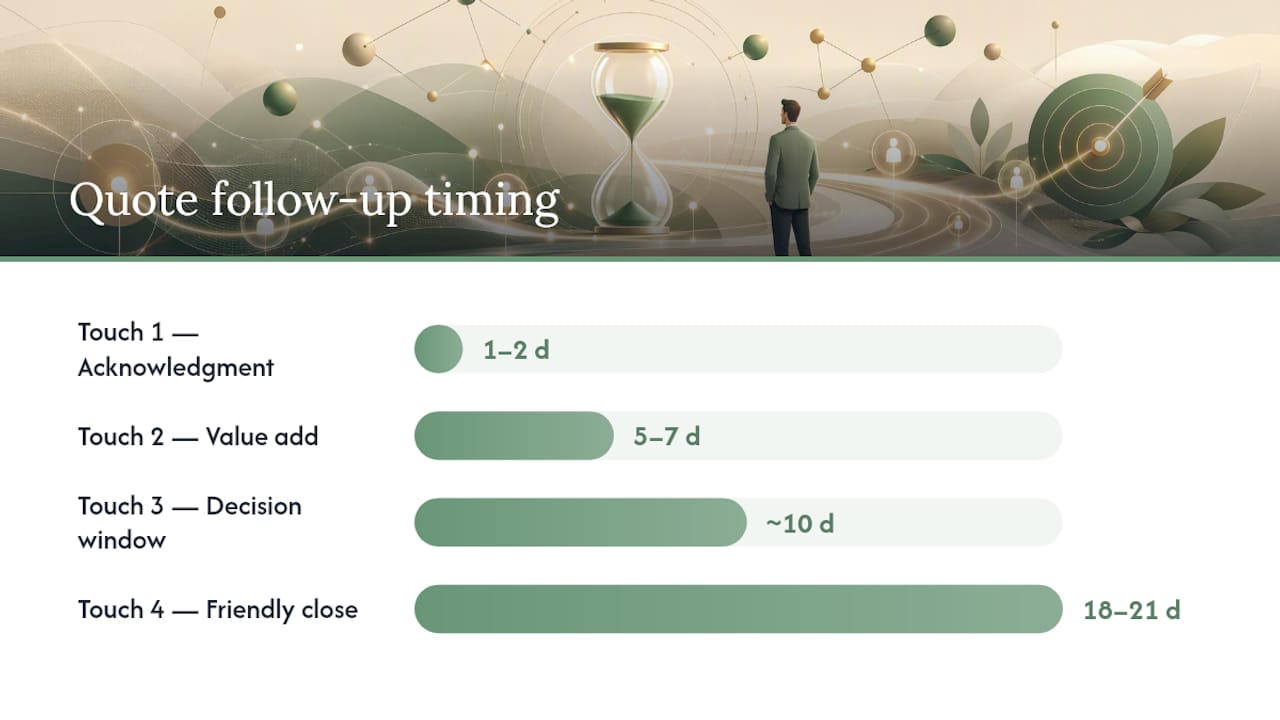
- Touch one, within the first couple of days: acknowledgment. Confirm receipt of the ask and restate the timeline. No pitch, no pressure, just “got it, here’s what happens next.”
- Touch two, day 5 to 7: value add. Share something useful, a relevant case, an answer to a question they asked, anything that isn’t just “checking in.”
- Touch three, about ten days after the first touch: decision window. Name a specific reason to decide now, whether that’s a scheduling constraint, a pricing window, or simply a deadline you set together.
- Touch four, day 18 to 21: friendly close. Low-pressure, direct: is this still something you want to move on, or should we close the file for now?
Two things make this work. First, structured, permission-based sequences outperform ad hoc follow-up because the client expects the next message instead of feeling chased. Second, automation only converts when it doesn’t feel automated. That means varying send times, changing the angle of each message, and using a real named sender instead of a generic “Sales Team” address. A robotic cadence trains clients to ignore you by touch two.
Pro Tip: Never send touch two and touch three at the same time of day. A Tuesday 9 a.m. email followed by another Tuesday 9 a.m. email a week later is the fastest way to look like a bot.
Total touch count matters less than most people assume. Four works well for a quote follow-up because the decision window is short. Longer sales cycles might need more touches spread out over a longer period. B2C transactions, on the other hand, usually compress the whole cadence into a single week because buying decisions happen faster and attention spans are shorter. Match the pace to the decision, not to a template you found online.
Which Channel Fits Each Touch in Your Sequence?
Picking the right channel per touch matters as much as the message itself. Here’s how the main channels tend to perform:
- Email carries the bulk of the sequence. It’s asynchronous, easy to personalize, and gives you room to include detail without pressuring the client.
- SMS works best for short, time-sensitive nudges, a reminder about a decision deadline or a confirmation request, not for anything that needs explanation.
- Phone earns its place at moments of real friction: a stalled decision, a high-value deal, or any point where a five-minute conversation resolves what three emails couldn’t.
- LinkedIn fits B2B relationships where the contact is more active there than in their inbox, particularly for touch one when you’re re-establishing context.
- In-person follow-up, common in field sales and services, still needs the same discipline: get explicit permission for a scheduled follow-up and log the commitment into the system before you leave, not after.
A workable four-touch sequence often mixes channels this way: email for the acknowledgment, email again for the value-add, SMS or a phone task for the decision-window touch, and email for the friendly close. The channel shift at touch three signals urgency without sounding pushy.
Whatever channel mix you choose, reply routing rules stay constant. The instant a client responds through any channel, the sequence pauses and a human takes over. Automation exists to handle silence, not conversation. A system that keeps firing scheduled messages after someone has already replied doesn’t just look sloppy. It actively damages the relationship you’re trying to build.
What Triggers and Exit Rules Keep Automation Accurate?
Every sequence needs entry rules and exit rules, or it eventually sends the wrong message to the wrong person at the wrong time. On the entry side, the common triggers are:
- No reply within a set window (three business days is a common default for a quote follow-up).
- A specific action, like a pricing page visit or a link click inside a previous message.
- A booked meeting that didn’t happen or got rescheduled.
Exit conditions matter even more, because getting these wrong is what makes automation feel broken. A sequence should stop the moment any of the following happens: the client replies, they unsubscribe, or they book a meeting. This depends on solid reply-parsing so the system recognizes a real response and reroutes to a human instead of continuing on autopilot.
Before rolling any of this out to your full client list, run it on a small pilot group first. Ten to twenty contacts is enough to catch a misfiring trigger, a tone mismatch, or a timing issue before it reaches everyone you work with. Fixing a broken sequence after it’s touched two hundred clients is a much worse conversation than fixing it after it’s touched ten.
What Deliverability and Compliance Basics Should You Check First?
None of the cadence work matters if your messages land in spam or you get flagged for a compliance violation. A few guardrails come before volume:
- Authenticate your domain. SPF, DKIM, and DMARC records are the baseline for proving your emails are legitimate, and most inbox providers now filter unauthenticated senders harder than they did a year ago.
- Warm up new sending domains gradually. Jumping straight to high volume on a fresh domain is one of the fastest ways to get flagged.
- Set daily sending caps and throttle sequences, rather than blasting an entire list at once.
- Register SMS senders under 10DLC rules and keep a documented consent record for every contact you’re texting.
- Follow basic email compliance rules (a working unsubscribe link, accurate sender information) as a matter of course, not an afterthought.
- Monitor bounce rates and spam complaints weekly. A rising bounce rate is often the first sign a list has gone stale before conversion numbers show it.
The metrics that actually tell you whether the system is healthy are reply rate and meetings booked, tracked alongside deliverability signals so a spike in one doesn’t mask a decline in the other. A sequence that gets replies but is quietly landing in spam for half your list is a problem you won’t see until it’s already cost you deals.
How Do You Choose the Right Follow-Up System?
Evaluating a follow-up system comes down to four practical questions: does it integrate with what you already use, does it support the level of automated decision-making you want, is the reporting tied to revenue, and does the pricing model fit how your client base actually grows.
On the technical side, check whether the tool sits on top of your calendar and inbox or requires you to work inside a separate interface. The best systems pull data automatically instead of asking you to re-enter it, which is where a lot of manual follow-up habits creep back in.
On the decision layer, most systems split into two architectures: an execution layer that only sends what you’ve explicitly built, and a decision layer that makes some calls on its own. Choose the execution layer if you want full control over every message; choose the decision layer if you’re comfortable letting the system judge when and how to follow up.
| Evaluation criteria | What to check |
|---|---|
| Integration surface | Native connections to your calendar, inbox, and CRM without manual re-entry |
| Decision layer | Execution-only control versus AI-assisted decision-making, with approval steps available |
| Analytics depth | Reporting tied to conversion and meetings booked, not just opens and clicks |
| Commercial model | Per-seat versus per-contact pricing, and a clear path to upgrade as your list grows |
Training and rollout time matter too. A system that takes your team three weeks to learn will lose momentum before it delivers a single measurable result.
What Does a 30-Day Rollout of a Follow-Up System Look Like?
You can get from zero to a working system in a month if you sequence the work correctly.
- Week 1: baseline and scope. Pull your current reply rate, follow-up completion rate, and quote-to-customer conversion. Pick the quote follow-up sequence as your first build since it has the shortest path to a measurable result.
- Week 2: build and configure. Write the four touches, set the entry triggers, configure exit conditions, and set up reply routing so a human always sees a response first.
- Week 3: pilot and validate. Run the sequence against a small group of ten to twenty contacts, check deliverability signals, and confirm reply-parsing correctly pauses the sequence.
- Week 4: roll out and iterate. Expand to your full active list, monitor reply rate and meetings booked daily, and adjust timing or message content based on what the pilot revealed.
| Week | Focus | Primary check |
|---|---|---|
| 1 | Baseline metrics, pick first sequence | Current reply rate and conversion rate |
| 2 | Build sequence, set triggers | Trigger logic tested against sample data |
| 3 | Internal pilot | Deliverability and reply-parsing accuracy |
| 4 | Full rollout | Reply rate and meetings booked trend |
Running a small control group that doesn’t receive the new sequence gives you a clean comparison, so you can measure real lift instead of guessing whether results came from the system or from seasonal demand.
How Does Otto Address the Common Follow-Up Failure Points?
Most follow-up systems fail for one of three reasons: commitments never get logged, triggers misfire because the tool doesn’t see real calendar and inbox activity, or automation sends something the client shouldn’t have received. Otto is built around closing all three gaps.
- Centralized commitment tracking. Every promise made by email or in a meeting gets logged in one dashboard, instead of living in someone’s memory or a scattered thread.
- Deep Gmail and calendar integration. Because Otto reads real inbox and scheduling activity, triggers reflect what actually happened, not a guess based on a stale CRM field.
- Approval-first drafting. Otto drafts the follow-up message, but nothing sends until you explicitly approve it, which solves the “feels robotic” problem at the source.
- Fits directly into a 30-day rollout. Because tasks and follow-ups already live in one place, week one’s baseline and week two’s sequence build both move faster with less manual setup.
Where Should a Small Team Focus First?
If your bandwidth is limited, don’t try to build five sequences at once. Get the quote follow-up sequence right first and log every commitment as it happens, because that single habit prevents more lost revenue than any amount of clever messaging. Protect your sender reputation before you chase more volume. A system sending to two hundred contacts with a clean domain beats one sending to two thousand and landing in spam.
Keep AI drafting in approval mode longer than feels necessary. It’s tempting to flip on full autonomy the moment the drafts look decent, but quality that looks good on day three can drift by week six if nobody’s checking it. Review before you trust.
— Eddie
Get Your Follow-Up System Running Without the Manual Grind
Otto handles the part most follow-up tools get wrong: closing the gap between “I said I’d follow up” and it actually happening. Because Otto reads your Gmail and calendar directly, it logs commitments the moment they’re made and drafts the next touch on schedule, but nothing goes out until you approve it. That approval step is the difference between automation that feels robotic and one that still sounds like you.

Picture a consultant who sends a proposal on a Friday. Normally that follow-up either happens late or not at all, buried under the next week’s client calls. With Otto, the follow-up is already drafted and waiting for a one-click approval by Monday morning, tied to the same commitment logged when the proposal went out. Set up your first follow-up sequence with Otto and see how much less falls through the cracks in your first week.
Sources
- Sales follow-ups (Spotio) — 2026
- Customer follow-up automation that isn’t robotic · Automation Labz
- Reply
- Monday