 Otto
OttoClose Action Items Fast: Meeting Summary Templates to Send Within 24 Hours
Close Action Items Fast: Meeting Summary Templates to Send Within 24 Hours

Use a one-page recap that leads with the headline decision, lists action items with a single owner and a real date, and lands in the recipient’s inbox within a few hours, never past 24. Pick from the three templates below, fill the skeleton, and send it before you switch tasks. Otto can also do the capturing and drafting for you automatically.
TL;DR:
- Sending meeting summaries within a few hours, preferably on the same day, ensures that action items stay fresh and are more likely to be completed on time.
- Using a structured template tailored to the meeting type, such as action-focused for project meetings or catch-up for absentees, increases clarity and adherence to tasks.
- Every summary must include specific owners and concrete deadlines for action items to prevent tasks from being overlooked or delayed indefinitely.
- AI tools can draft meeting recaps quickly, but human verification is essential to ensure owners, dates, and key details are accurate before distribution.
- Automating follow-up and tracking commitments through tools like Otto can significantly improve task completion rates and reduce manual re-entry of promises across platforms.
Table of Contents
- What Are the Best Meeting Summary Templates to Use?
- What Fields Should Every Meeting Summary Include?
- How Do You Turn a Meeting Into a Summary People Actually Read?
- Can AI Tools Write Your Meeting Summary for You?
- Three Copy-Paste Meeting Summary Templates You Can Use Today
- How Does an AI Chief of Staff Close the Loop on Action Items?
- What I’d Actually Try for Two Weeks
- Try Otto to Stop Rewriting the Same Recap Every Week
- Sources
- FAQ
What Are the Best Meeting Summary Templates to Use?
There is no single perfect format. The right meeting recap template depends on who is reading it and what they need to do next. Three formats cover almost every situation you will run into.
1. The compact recap. This is your default for internal meetings, weekly syncs, and standing calls. It opens with a one-line headline outcome, then decisions, then action items. Nothing else. Use this one when the goal is simply to confirm what happened and keep everyone aligned.
2. The action-item-focused summary. Delivery teams, engineering standups, and project meetings live and die by task ownership, so this template pushes decisions into a short block and gives action items the most real estate on the page. Each task gets its own line with an owner and a date, formatted almost like a checklist. If your meetings routinely spin off five or more tasks, this is the format that keeps them from getting lost in prose.
3. The catch-up template for absentees. Built for the person who missed the call and needs the outcome in under a minute. It skips the play-by-play and gives context in one sentence, then decisions, then only the action items that affect that specific reader. A fixed skeleton used consistently across meeting types tends to get adopted faster than a format that changes every week, so resist the urge to redesign your template for every meeting. Match emphasis to the meeting type instead of rebuilding the structure from scratch.
Here’s a quick way to decide which one you need:
- Weekly team sync with no big decisions? Compact recap.
- Sprint planning or client delivery call? Action-item-focused.
- Board update or all-hands where half the company wasn’t there? Catch-up template.
What Fields Should Every Meeting Summary Include?
Every format above shares the same core fields. Skip one of these and the recap stops doing its job.
- Header block: meeting title, date and time, attendees, and who facilitated.
- One-line headline: the single outcome someone would want to know if they read nothing else.
- Decisions: specific statements of what was agreed, not a summary of the discussion that led there.
- Action items: a verb-first task, one named owner, and a calendar date, never “soon” or “next week.”
- Next steps and open questions: anything still unresolved, kept short.
Meeting summaries differ from formal minutes in exactly this way. Minutes are archival records meant to capture everything said; a summary is an action-oriented document built around decisions and what happens next. If two people share responsibility for one task, split it into two separate line items. A task with two names attached usually means nobody actually owns it.
Pro Tip: Write action items in the format “[Name] will [verb] by [date]” every single time. The repetition feels rigid at first, but it’s what makes a summary scannable in five seconds instead of thirty.
How Do You Turn a Meeting Into a Summary People Actually Read?
The process matters as much as the template. Here’s the sequence that works whether you’re writing by hand or cleaning up an AI meeting agenda generator’s output:
- Capture live. Take notes during the meeting, or assign one person as notetaker. Don’t try to reconstruct the meeting from memory an hour later.
- Drop notes into the skeleton immediately. Fill the template fields while the conversation is still fresh, before you open your next tab.
- Verify owners and dates. Read every action item out loud. Does it have exactly one owner and one real date?
- Send it in the message body. Paste the recap directly into the email or Slack message instead of attaching a file. Recipients should see their action item without a single click.
- Invite corrections. Add one line asking people to reply if anything looks off. That reply becomes your correction record.
Speed is the variable most teams get wrong. Sending within a few hours, with 24 hours as the outside limit, preserves the momentum from the meeting itself. Wait two days and half your action items feel optional again.
Can AI Tools Write Your Meeting Summary for You?
Mostly, yes, and this is where meeting notes automation earns its keep. AI notetakers and transcription tools reliably extract speaker labels, topic segments, and even a first pass at suggested action items. What they consistently get wrong is the fine detail that makes a summary useful: exact owners, real calendar dates, and specific numeric targets.
Run this checklist on any AI-generated draft before it goes out:
- Does every action item name an actual person, not “the team” or “someone”?
- Does every date say something concrete, like “October 3,” instead of “soon”?
- Is the task verb specific (“draft,” “approve,” “send”) rather than vague (“look into”)?
- Are numbers, budgets, or targets mentioned in the meeting actually captured?
AI can draft the summary in seconds, but the verification pass is what keeps the document trustworthy. Skip that human check and you’ll eventually send a recap with the wrong owner attached to a real deadline.
Three Copy-Paste Meeting Summary Templates You Can Use Today
Paste any of these directly into an email or Slack message and fill in the brackets.
1. Quick internal recap Meeting: [Title] — [Date] Attendees: [Names] Headline: [One sentence outcome] Decisions: [Bullet list] Action items: [Owner] will [task] by [date] Next steps: [One line]
Filled example: “Headline: We’re moving the launch to November 12. Decisions: Marketing owns the announcement copy. Action items: Priya will finalize pricing by Thursday.”
2. Action-item-focused summary Meeting: [Title] — [Date] Decisions (brief): [1 to 2 lines] Action Items:
- [Owner] — [Task] — Due [Date]
- [Owner] — [Task] — Due [Date] Next steps: [One line]
Filled example: “Marcus — Fix checkout bug — Due Friday. Leah — Ship staging build — Due Wednesday.”
3. Catch-up for absentees You missed: [Meeting] on [Date] What happened: [One sentence] Decision: [One line] Your action item, if any: [Owner] will [task] by [date]
How Does an AI Chief of Staff Close the Loop on Action Items?
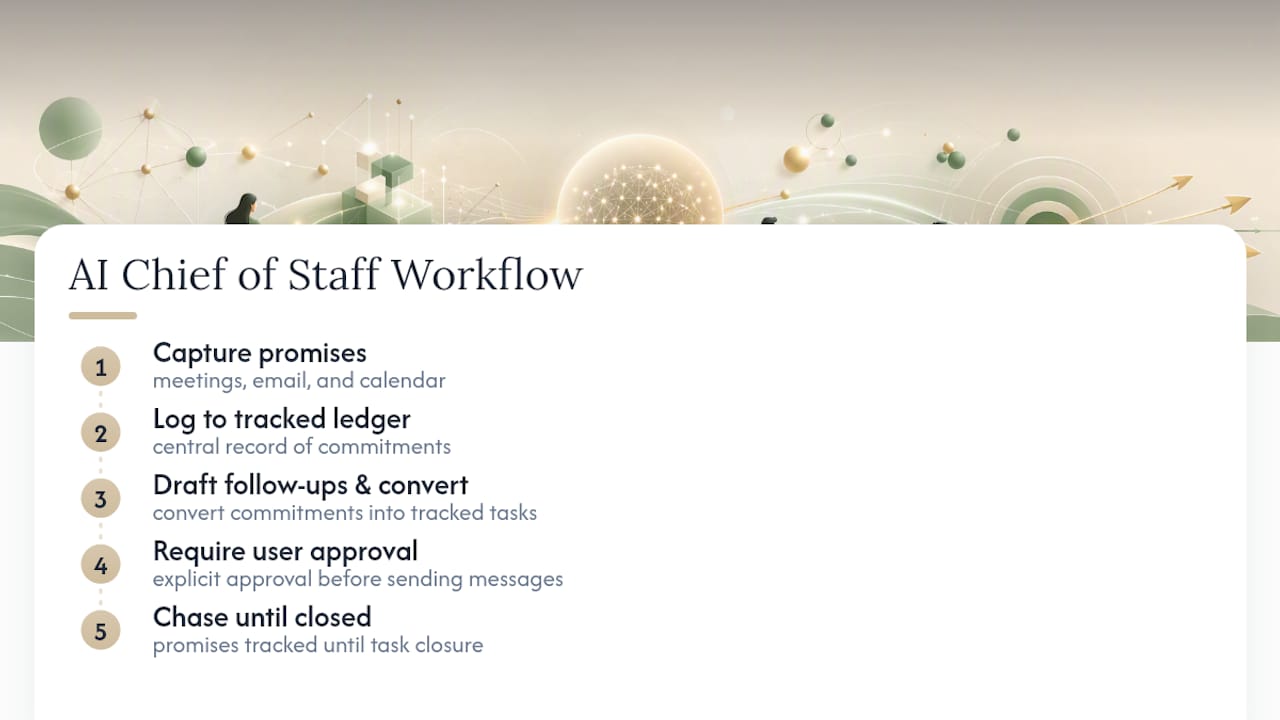
Templates solve the writing problem. They don’t solve the follow-up problem, which is where most action items actually die. Some AI tools capture promises across meetings, email, and calendar into a tracked ledger instead of leaving them in documents nobody reopens. When someone commits to a deadline on a call, Otto logs it alongside anything promised over email, so nothing depends on someone remembering to copy it into a tracker.
From there, such tools can draft follow-up messages and convert commitments into tracked tasks automatically, while requiring explicit user approval before sending anything. That single shift, from “write a summary and hope people act on it” to “have every promise chased until it’s closed,” is the difference between a recap and an actual system.
What I’d Actually Try for Two Weeks
Completeness is overrated. A messy summary sent in an hour beats a polished one sent tomorrow, because the decision is still warm in everyone’s memory. If you want proof, pick one template above, use it for every meeting for two weeks, and count how many action items actually get closed by their due date. Most teams are surprised by how much that one habit, speed paired with a single named owner, changes.
— Eddie
Try Otto to Stop Rewriting the Same Recap Every Week
Otto is the alternative to writing and chasing meeting summaries by hand: it listens in on meetings, reads your email and calendar, and turns every commitment made anywhere into one tracked action item, so you stop being the person copying context between tools.

You get automatic capture from meetings and email, a single ledger of open promises, tasks that get created without manual entry, and drafted follow-up messages that wait for your approval before anything goes out. That last part matters: Otto speeds up the drafting, but you still decide what actually gets sent. Businesses adopting AI-driven workflow shifts are seeing exactly this kind of change, where the tool handles the repetitive tracking and the person handles the judgment calls.
Start on the Free plan at Otto and see how many action items stop slipping once something else is chasing them for you.
Sources
- How to write a meeting summary (with tips, template, and example) | Zoom
- Meeting recap format: the structure that gets read and acted on · Scribbl
- Free meeting summary template + filled-in examples - Pabau
- How to Write a Meeting Summary (Or Let AI Do It) — MeetWave Blog
FAQ
Can ChatGPT summarize meeting notes?
Yes, ChatGPT and similar tools can turn a transcript or raw notes into a structured summary reasonably well. The catch is accuracy on specifics: it can miss the exact owner, the real due date, or a numeric target mentioned mid-conversation, so a quick human check before sending is still worth the extra minute.
What are the 5 P’s of meetings?
There’s no single agreed-upon “5 P’s” framework for meetings in wide use, and definitions vary depending on the source. Rather than chase an acronym, focus on what actually makes a summary work: purpose, decisions, action items with owners and dates, and next steps.
What is the 40/20/40 rule for meetings?
This isn’t a standardized or widely documented meeting rule, so treat any specific version you see with caution. What does hold up across formats is spending real prep time before the meeting and real follow-up time after it, which is exactly what a same-day summary accomplishes.
Is there a meeting notes template in Word?
Yes, Microsoft offers several editable meeting minutes templates in Word, along with similar libraries in Google Docs, Canva, and Notion. Any of those work fine as a starting skeleton, though a plain-text version pasted directly into email or Slack tends to get read faster than an attached file.
How much does Otto cost?
Otto offers a Free plan, an Upgraded plan at $20 per month, and a Max plan at $50 per month. All three include meeting capture and the shared action ledger, with higher tiers unlocking more usage and integrations.