 Otto
OttoStop Losing Promises: Meeting Transcription for Teams, 4 Steps to Close
Stop Losing Promises: Meeting Transcription for Teams, 4 Steps to Close

Meeting transcription turns spoken conversation into a searchable transcript, an AI-generated summary, and a list of tracked action items. Teams that adopt it spend less time asking “wait, what did we decide?” and more time executing on what was actually decided. Tools now built on this pattern, including Otto, extend that further by linking each promise made on a call to a ledger that follows up until it’s closed.
TL;DR:
- Meeting transcription tools vary in capture methods, with browser or desktop recording now increasingly favored for cleaner audio and ease of use.
- Effective transcripts must include timestamps, speaker labels, summaries, decisions, and action items linked to owners and deadlines to be truly useful.
- Transcription accuracy significantly drops in noisy, multi-speaker, or accented environments; best practices involve using headsets and muting silent participants.
- Implementing proper security, encryption, and retention policies is essential to comply with legal requirements and protect sensitive information.
- Automated workflows linking transcripts, emails, calendars, and task managers boost follow-up actions, especially when integrated into a centralized AI-driven platform.
Table of Contents
- What Meeting Transcription Delivers for Teams
- How AI Meeting Transcription Works and Capture Methods
- Key Features to Evaluate Before You Commit to a Workflow
- How Accurate Is Meeting Transcription, Really?
- Privacy, Security, and Legal Considerations
- Turning Transcripts Into Action: A Follow-Up Workflow
- Why an Integrated AI Chief of Staff Changes the Game
- Balancing Automation and Human Review
- Try Otto to Close the Loop on Every Meeting
- Sources
What Meeting Transcription Delivers for Teams
A finished transcript should hand you more than a wall of text. Good meeting transcription software produces a full transcript with timestamps and speaker labels, an executive summary, a short list of decisions, and action items tied to names and dates. That structure matters more than the raw word count.
It shows up in ordinary team moments. A new hire catches up on three weeks of project history in ten minutes. Someone who missed the client call reads the summary instead of asking a colleague to reconstruct it from memory. Sales teams hand off a transcript to onboarding so nothing promised on the demo call gets lost. Legal or compliance teams keep an audit trail without assigning someone to take notes by hand.
None of that works if the output stays trapped in one app. The categories that matter most are:
- Calendar integrations that attach transcripts to the right meeting automatically
- Email integrations that send recaps to attendees without manual copying
- Task manager integrations that turn action items into tracked to-dos with owners
How AI Meeting Transcription Works and Capture Methods
Every meeting transcription ai tool has to solve the same problem first: how does it actually hear the meeting? Four capture approaches dominate the market, each with a real trade-off.
- Bot participant: a virtual attendee joins the call and records audio directly from the platform. Reliable across most video tools, but it requires host approval and shows up in the participant list, which some meeting hosts flag or block outright.
- Browser-tab or desktop capture: the software records system audio without joining as a visible participant. This invisible, bot-free method is gaining ground because it sidesteps host-approval friction entirely and tends to deliver cleaner audio since it’s pulling straight from the source rather than re-recording through a second microphone.
- Direct device recording: a phone or laptop mic captures an in-person meeting, useful for whiteboard sessions or conference rooms without a video call at all.
- File upload: post-meeting transcription of an existing recording, handy for teams that already record calls but want the AI layer added afterward.
Once audio is captured, the pipeline runs audio cleaning, then speech-to-text conversion, then speaker diarization to separate who said what, then natural language processing to pull out summaries and action items. Latency and audio quality at each stage compound, so a noisy input degrades every step downstream.
Key Features to Evaluate Before You Commit to a Workflow
Before locking into any automatic meeting transcription setup, run it against a short checklist. Skipping this step is how teams end up with a tool that transcribes beautifully but never gets used.
Feature fit:
- Does it handle both real-time transcription and post-meeting file upload?
- Does it separate speakers reliably (diarization), and can you rename speaker labels?
- Can you edit the transcript directly, or only export a locked version?
- Does the summary actually capture decisions, or just paraphrase the conversation?
- Does it extract action items with owners and deadlines, not just a bullet list of topics?
- What languages does it support, and does accuracy hold up in non-English speech?
- What export formats are available: plain text, PDF, or a structured format for other tools?
Operational fit: check setup friction, whether it needs host approval to join, which platforms and devices it supports, and whether admin controls let you manage who can invite the recorder.
Business fit: confirm the security posture, how long transcripts are retained by default, and whether pricing runs per minute, per user, or as a flat enterprise seat.
Pro Tip: Test any candidate tool on your messiest recurring meeting, not your cleanest one. A tool that handles a five-person call with crosstalk and a bad connection will handle everything easier than that. A tool that only performs well on a clean two-person call will disappoint you the first busy week.
How Accurate Is Meeting Transcription, Really?
Vendors love to advertise high accuracy numbers, and under ideal conditions those numbers are often real. The catch is that “ideal conditions” means a quiet room, a single accent, and a good microphone six inches from someone’s mouth. Add background noise, three overlapping speakers, or a strong regional accent, and word-error rates climb fast. That gap between the marketing claim and your actual conference room is the single biggest source of frustration with meeting transcription tools.
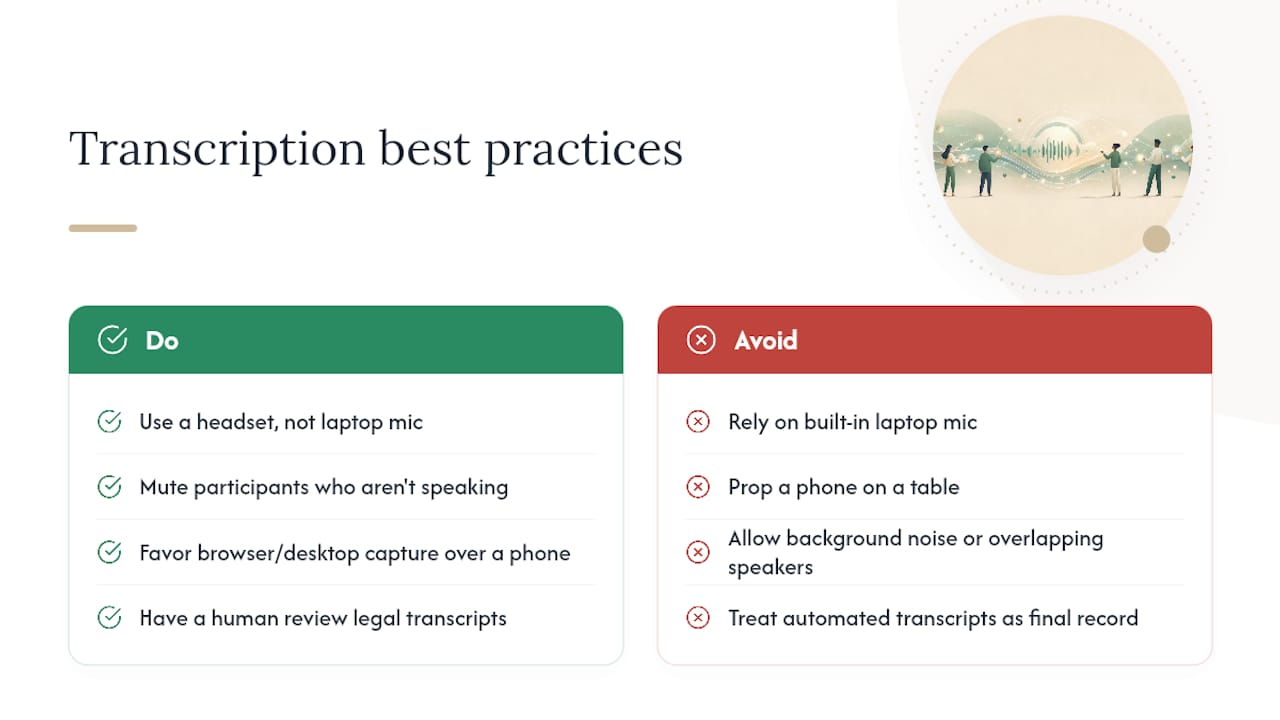
You can close most of that gap with basic habits: use a headset instead of a laptop’s built-in mic, mute participants who aren’t speaking, and favor browser or desktop capture over a phone propped on a table when you have the choice. For anything with legal weight, contract language, regulatory minutes, board resolutions, plan on a human reviewing the transcript before it becomes the official record. Automated transcription is a strong first draft. It is not a substitute for review when the stakes are high.
Privacy, Security, and Legal Considerations
Recording a meeting isn’t purely a technical decision. Consent rules for recording conversations vary significantly by jurisdiction, and platform policies (Zoom, Teams, Google Meet) add another layer of rules about who needs to be notified before a bot or recorder joins. Check both before you turn transcription on by default for external calls.
Once you’re recording, security practice matters as much as legal compliance:
- Confirm transcripts are encrypted both at rest and in transit, not just during upload.
- Limit who can export a transcript, since export permissions are often looser than view permissions by default.
- Set a retention policy that automatically deletes or archives old transcripts rather than letting them accumulate indefinitely.
Rules differ enough by country and by industry that a quick check with local counsel or your compliance team beats guessing, especially for regulated industries like healthcare or finance.
Turning Transcripts Into Action: A Follow-Up Workflow
A transcript that nobody acts on is just a longer meeting. The value shows up in the follow-up sequence, and it’s the same four steps regardless of the tool:
- Generate a concise executive summary immediately after the call ends, ideally under 200 words for a standard meeting.
- Extract decisions and action items separately from the general summary, since burying a decision inside narrative text is how it gets missed.
- Assign an owner and due date to every action item before the meeting is considered closed.
- Push each item to a task manager or calendar rather than leaving it sitting in a document.
Different meeting types call for different templates. A daily standup needs a three-line recap. A sales call needs a summary organized around objections and next steps. A quarterly planning session needs a longer decision log. Automation earns its keep at the handoff stage: auto-sending recap emails, auto-creating tasks in a project tool, and linking the transcript to related docs so context isn’t scattered across five apps. Automated content and summary workflows built on this pattern have shown real time savings when the summary step feeds directly into task creation instead of sitting idle.
| Meeting type | Ideal summary length | Primary output |
|---|---|---|
| Daily standup | 2 to 3 lines | Blockers and owners |
| Sales call | Half page | Objections and next steps |
| Planning session | Full page | Decision log |
| Client review | Half page | Action items with deadlines |
Why an Integrated AI Chief of Staff Changes the Game
Most meeting transcription apps stop at the transcript. They hand you a clean summary and a task list, then forget everything the moment you close the tab. The problem is that a promise made on a call rarely lives in isolation. It usually connects to an email thread, a calendar deadline, or a commitment made in a different meeting entirely.
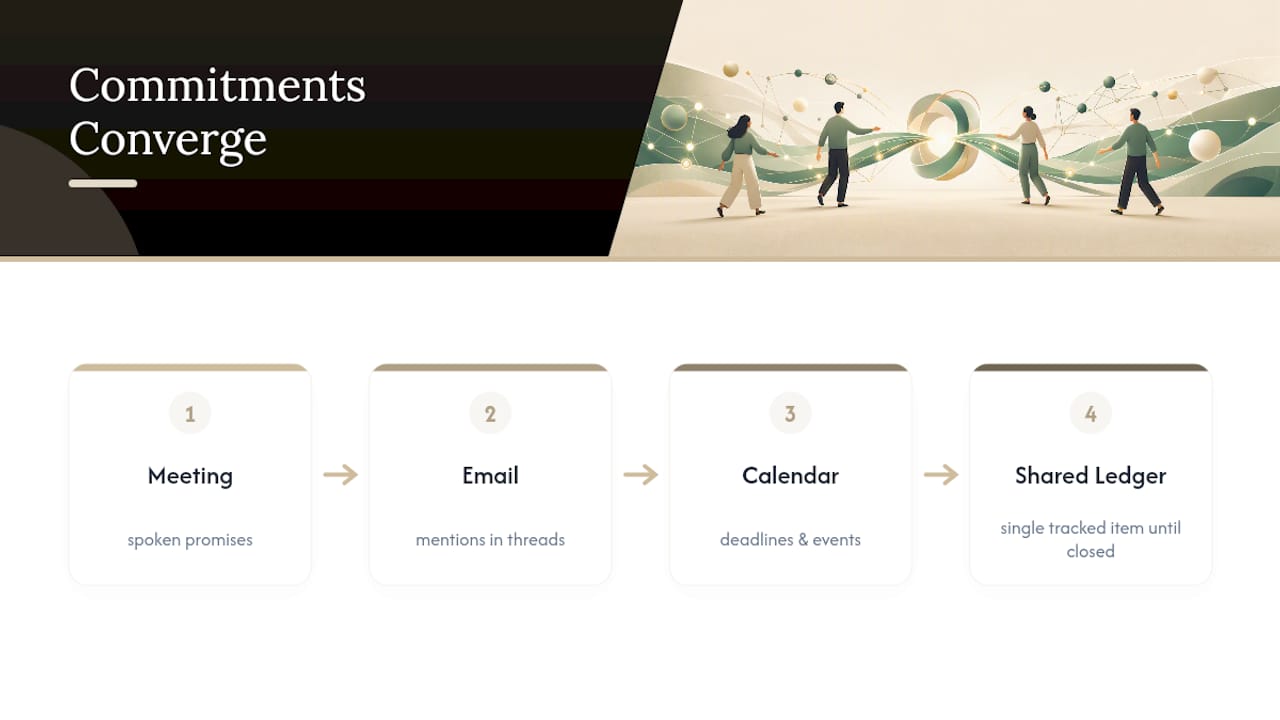
Otto treats meetings as one input among several rather than the whole picture. It listens to the call, reads the surrounding email and calendar context, and logs every commitment into a single ledger that it tracks until closed. Say something out loud on a Tuesday call, mention it again in a Thursday email, and Otto connects both to the same open item instead of treating them as unrelated events. That mirrors a broader shift in the market: tools like Read AI’s email-based assistant are also moving toward linking inbox and calendar context to meeting data, because a transcript alone was never the finish line.
Balancing Automation and Human Review
Automation gets the transcript and the first-draft summary right most of the time. It gets speaker attribution wrong in crosstalk, misreads sarcasm as a decision, and occasionally invents an action item out of a hypothetical someone floated. None of that is a reason to skip automation. It’s a reason to build a review step around it.
Set a short review window, ten minutes right after the call, and assign one person as the owner for anything with legal or financial weight. Everything else can ship on the AI’s first pass.
— Eddie
Try Otto to Close the Loop on Every Meeting
Otto isn’t just another transcription layer sitting on top of your calendar. It ingests your meeting transcripts, connects them to the emails and calendar events they touch, and tracks every promise made in any of those channels until it’s actually resolved.

That’s the gap most meeting transcription apps leave open: they’re excellent at capturing what was said, but blind to everything else happening around that meeting. Otto sees the inbox, the calendar, and the conversation as one connected record, so a commitment you made on a call shows up alongside the email that referenced it and the deadline sitting on your calendar. Nothing gets drafted or sent without your approval. Otto proposes, you decide. If you’re tired of being the one holding all those connections together in your head, try Otto and see what your next meeting looks like when the follow-up handles itself.