 Otto
OttoReminders vs Tasks for Founders: How AI Chiefs of Staff Catch Promises
Reminders vs Tasks for Founders: How AI Chiefs of Staff Catch Promises

Reminders are transient alerts. Tasks are owned, tracked commitments with an owner, deadline, and follow-up trail. The confusion between the two is why so many promises made in email threads, calendar invites, and meetings quietly die, and why an AI chief of staff like Otto exists: to catch every promise across those three channels and route it into the right bucket automatically.
TL;DR:
- Only commitments involving other people should be tracked as tasks, while personal reminders lack context and do not require ownership or deadlines.
- An AI chief of staff like Otto can automatically extract promises from email, meetings, and chats, then structure and assign them without manual input.
- Following a five-step workflow—capture, triage, assign, schedule, and automate follow-ups—reduces alert fatigue and ensures high-stakes promises are prioritized properly.
- Tasks with no scheduled calendar blocks or explicit ownership are likely to be forgotten or dismissed, increasing the risk of trust failures.
- Consistently routing all commitments through one system, adding owner fields, and scheduling focus time allow for a clear, actionable morning briefing every day.
Table of Contents
- What’s the Real Difference Between Reminders and Tasks?
- Why This Distinction Matters for Founders and Chiefs of Staff
- How an AI Chief of Staff Bridges the Commitment Gap
- A Five-Step Workflow to Run Starting Monday
- Decision Rules: When to Graduate a Reminder Into a Task
- Implementation Checklist to Cut Alert Fatigue
- A Morning Briefing That Actually Changes How You Work
- Get Your Commitments Out of Your Head and Into Otto
- Sources
What’s the Real Difference Between Reminders and Tasks?
A reminder is a nudge. It fires at a time or place and disappears once dismissed. There’s no owner field, no subtasks, no record of who asked for it or why it mattered. A task is a unit of work with structure: an owner, a due date, context about the ask, and often dependencies on other work. One is a tap on the shoulder. The other is a line item someone is accountable for finishing.
That structural gap explains why treating every promise as a reminder is risky. A commitment tracking system stores who, why, and when, which matters enormously once a promise involves another person waiting on you. Reminders don’t carry that context. Tasks do.
Here’s how the two compare inside a commitment-led workflow:
| Attribute | Reminder | Task |
|---|---|---|
| Primary goal | Prompt a quick action | Track ownership through completion |
| Complexity | Single step | Often multi-step, may have subtasks |
| Trigger | Time or location | Deadline, dependency, or review cycle |
| Duration | Seconds to dismiss | Minutes to days to complete |
| Organization | Flat list | Owner, priority, project, status |
| Collaboration | Usually solo | Frequently involves a counterparty |
| Ideal use case | “Call the pharmacy at 3pm” | “Send the revised term sheet to the investor by Friday” |
The overlap is where people get it wrong: they leave commitments in the reminder column because reminders are faster to create.
Why This Distinction Matters for Founders and Chiefs of Staff
Get this wrong and it costs you more than a missed errand. A reminder that slips is annoying. A task that slips, when it’s really a promise to an investor, a candidate, or a client, is a trust failure. Most productivity tools track tasks but not commitments, which means the software itself can’t tell the difference between “buy coffee filters” and “get the auditor the signed engagement letter.”
There’s a second cost that’s less obvious: alert fatigue. Stack every promise as a reminder and your phone buzzes constantly with no sense of which alert actually matters. You start dismissing things reflexively, which is exactly the failure mode you built the system to prevent. Context blindness follows close behind. A reminder that just says “follow up with Sarah” tells you nothing about what you owe her or why it’s urgent.
Sort correctly, though, and your attention gets freed up for the work that actually needs it. You stop relitigating what’s real and what’s noise every time your phone lights up.
How an AI Chief of Staff Bridges the Commitment Gap
The core problem is that promises get made in three different places, email, calendar invites, and live meetings, and almost nothing watches all three at once. An assistant that only reads your inbox misses what you agreed to verbally on a call. One that only transcribes meetings has no idea what you already promised by email that morning. Otto works from a single memory across all three, which is the only way to catch a commitment made in one channel and follow it into wherever it needs to land next.
Once a promise surfaces, the work isn’t done. Someone has to extract it, assign an owner, and set a deadline, and doing that by hand is exactly the kind of glue work that eats a chief of staff’s day. Research into commitment tracking shows a multi agent AI can extract commitments from unstructured text, reconcile them against your existing calendar and task load, and score how likely each one is to slip. That’s a meaningfully different job than a calendar alert firing at a fixed time.
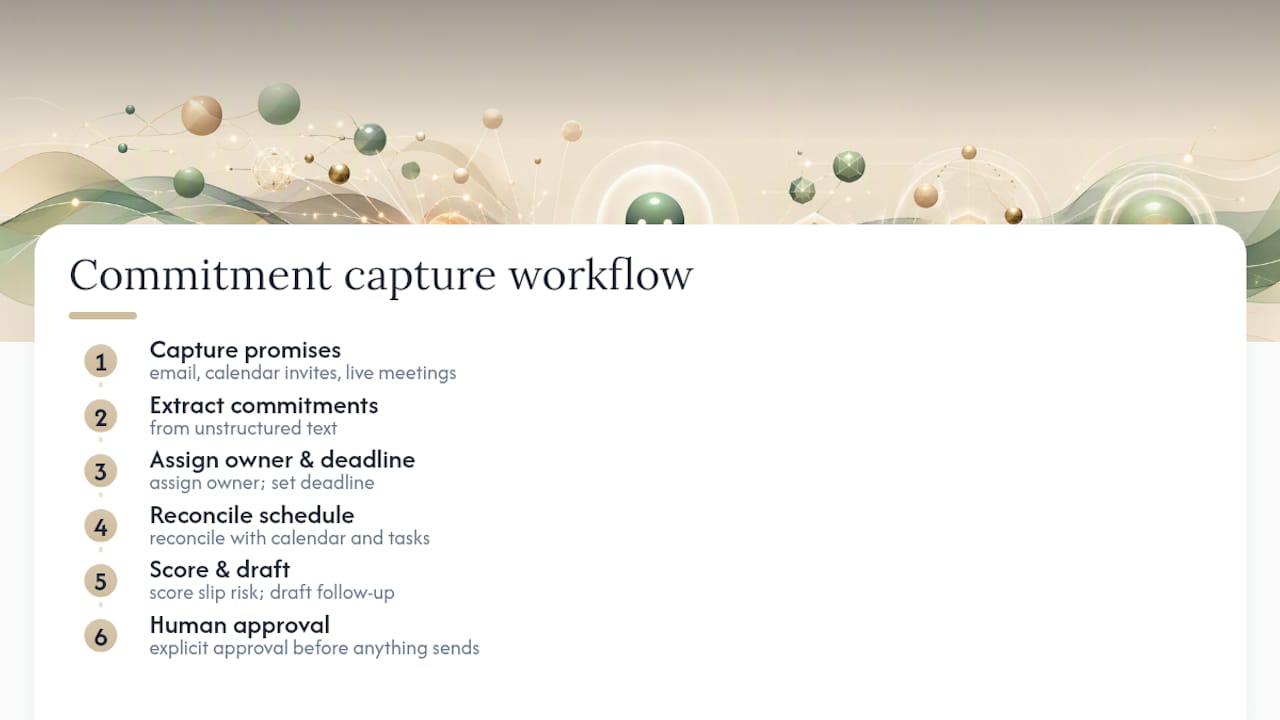
None of this happens invisibly, either. Otto drafts the follow-up, the reassignment, or the outbound nudge, but nothing goes out without your explicit approval. The AI does the sorting and structuring. You keep the final call on anything that leaves your name.
A Five-Step Workflow to Run Starting Monday
You don’t need new software philosophy to fix this, you need a repeatable loop. Here’s the version worth running:
- Capture everything fast. Every promise, whether it lands in your inbox, a meeting, or a hallway conversation, goes into one inbox first. Don’t sort at the moment of capture; sort later.
- Triage daily. Once a day, run through that inbox and ask one question per item: does this need more than one step, or involve someone else’s expectations? If yes, it graduates to a task.
- Graduate and assign ownership. A graduated task gets an owner, even if that owner is you, plus a deadline and enough context that anyone could pick it up cold.
- Block calendar time for anything real. A task with no scheduled time is a wish. Give substantial work an actual block, not just a due date sitting on a list.
- Automate the follow-up. Set an escalation rule so a stalled task resurfaces on its own instead of waiting for you to remember it exists. This is also where execution risk scoring earns its keep, flagging the commitments most likely to slip before they actually do.
Run this loop daily and your reminder list stays short by design, because anything with real stakes has already moved somewhere with more structure.
Decision Rules: When to Graduate a Reminder Into a Task
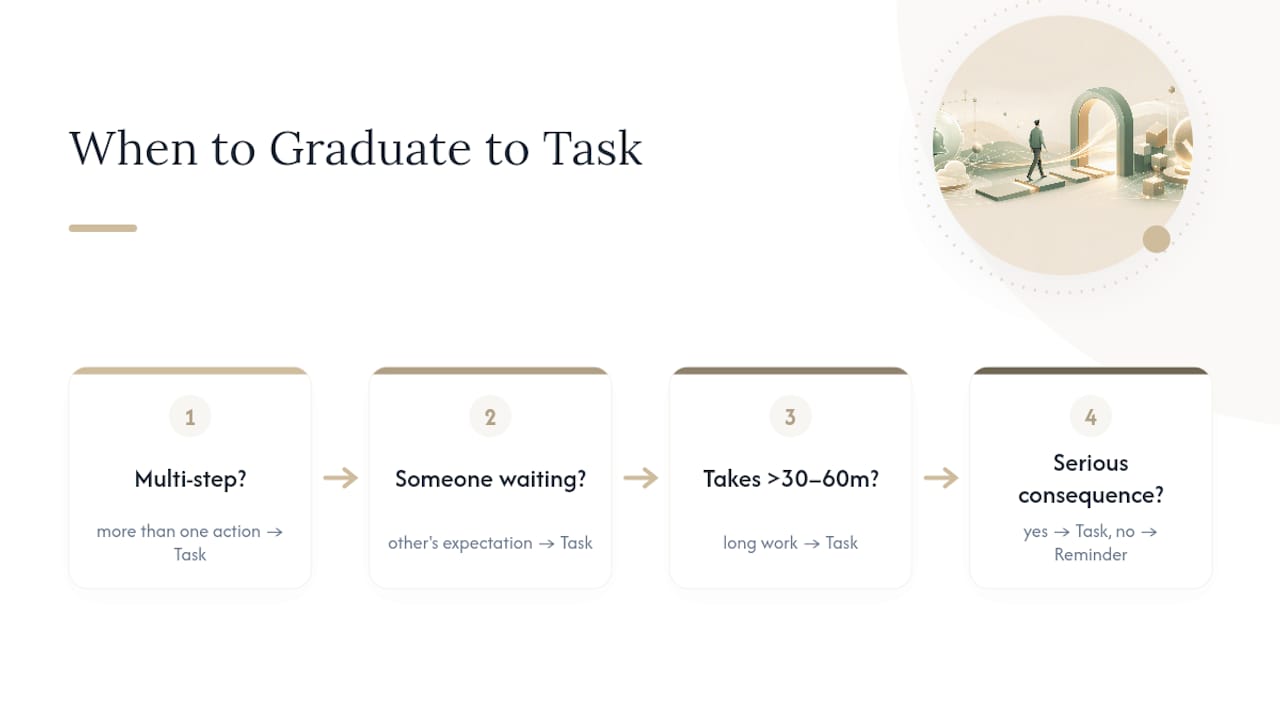
Triage goes faster with a fixed checklist instead of a gut call every time. Ask these questions in order:
Is it multi-step? Anything with more than one action belongs in the task column. Does it involve another person’s expectations? If someone else is waiting on you, that’s a commitment, not a personal errand, and it needs the trust-preserving structure a task provides. Will it take more than 30 to 60 minutes? Longer work needs a scheduled block, not just an alert. Does it depend on something else finishing first? Dependencies need visible tracking. What happens if you miss it?
If the answer to that last question is “nothing much,” leave it as a reminder. If it’s “someone loses confidence in me,” it’s a task.
Timing matters too. Reserve due-date alerts for real deadlines with actual consequences, and pair them with an earlier start prompt so you’re not scrambling the night before. “Pick up dry cleaning” stays a reminder. “Send the board deck” is a task with a start checkpoint three days out and a calendar block the day before.
Implementation Checklist to Cut Alert Fatigue
A few habit changes make the whole system hold together:
- Pick one system of record for deadlines and commitments, and route every capture into it rather than scattering across apps.
- Set start reminders in addition to due-date reminders. Due dates alone invite last-minute scrambling.
- Add calendar blocks for anything that takes real focus time, not just a line on a list.
- Require an owner field on every task, even when the owner is you.
- Turn on meeting and email capture so promises made out loud don’t rely on your memory.
- Schedule a short morning briefing that surfaces what’s actually at risk that day.
None of this is complicated. It’s just consistent, and consistency is the part most people skip after week two.
A Morning Briefing That Actually Changes How You Work
The first week I ran a strict reminder versus task split, the difference showed up immediately in the morning briefing. Instead of forty scattered alerts, I saw six real tasks with owners attached and a short list of things worth a glance, nothing more. One flagged commitment, a follow-up promised to a candidate three days earlier, would have quietly died in an inbox. It didn’t, because the system graduated it the moment it detected a named person waiting on a reply. That’s the entire value case in one morning: not fewer notifications, but the right ones.
— Eddie
Get Your Commitments Out of Your Head and Into Otto
An AI chief of staff bridges the gap between a promise made on a call and a task someone actually owns by working from a single shared memory across email, calendar, and meetings, so a commitment made in one place gets captured, structured, and assigned an owner automatically.

Once something is captured, The AI keeps a ledger of every open commitment and chases it with drafted follow-ups, not fire-and-forget alerts. Every draft, whether it’s a reminder to a colleague or a nudge to a client, waits for your explicit approval before it goes anywhere. Nothing gets sent on your behalf without you seeing it first.
If you’re a founder or chief of staff currently holding all of this in your head, or worse, in six different apps, that’s the actual cost this workflow is designed to eliminate. Start at Ottohq and see what your morning briefing looks like once reminders and tasks stop competing for the same list.
Sources
For deeper background on the mechanics covered here, see the case for AI-driven commitment tracking, the PromiseKeeper project on multi-agent commitment extraction, and a practical breakdown of delegation and task management tools.
- Why Your AI Should Track Your Commitments (Not Just Your Calendar) | Slime
- abdurrahmanKhan/promiseKeeper
- Most Productivity Tools Are Broken — So I built an AI That Tracks Promises | Medium
- Due date reminders for busy professionals: The complete guide